

1-Day Instructor-Led Course
Available in either Web-Based Delivery or On-Site Delivery
Minimum 10 Students – Maximum 20 Students
What Students are Saying about this class:
- “This is an amazing course. Learning about Interchannel interference & other devices (microwave)”
- “Great Instructor…is patient and works with the students to ensure everyone is on the same page of understanding. Helps those that are stuck and appreciates that there are no ‘stupid’ questions!”
- “Andrew was awesome. Very knowledgeable – eager to help…speaks clearly, timely, answers questions.”
- “Best Class I have ever attended – great job Andy”
Course Description
Wi-Fi has become the primary network connection for many residential and business customers. When customers experience slow speeds, poor coverage, dropped connections, or difficulty connecting devices, the first call often goes to Customer Support.
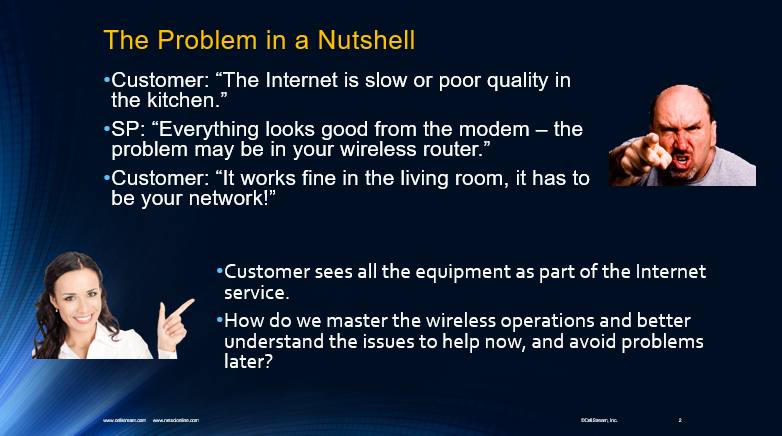
The CSI-IL-010 Wi-Fi/WLAN Operations for Customer Support course gives customer-facing personnel the practical Wi-Fi knowledge they need to better understand these problems, communicate effectively with customers, and work more efficiently with technical support and field operations teams.
This fast-paced one-day course focuses on the operational aspects of Wi-Fi without requiring students to become wireless engineers. Students learn the terminology, technologies, and troubleshooting concepts necessary to understand what may be happening in a customer’s wireless environment.
The course introduces important Wi-Fi concepts including radio frequencies, channels, Access Points, client devices, SSIDs, authentication, association, interference, signal strength, distance, coverage, and device density. Students also learn how these factors can affect the customer’s Wi-Fi experience.
Special emphasis is placed on helping support personnel distinguish between a Wi-Fi problem and a broader network or service problem. Understanding this distinction can improve troubleshooting, reduce unnecessary escalations, and help support teams communicate more accurately with customers and technical personnel.
Questions addressed during the course include:
- Why does Wi-Fi performance vary throughout a home or business?
- How do distance and signal strength affect Wi-Fi performance?
- What causes wireless interference?
- What is the difference between the 2.4 GHz and 5 GHz Wi-Fi bands?
- What are SSIDs, Access Points, and Wi-Fi clients?
- How does a device find and connect to a Wi-Fi network?
- Why can one customer’s device work while another device has problems?
- How can too many wireless networks or devices affect performance?
- What information should Customer Support gather before escalating a Wi-Fi problem?
- What simple recommendations can improve a customer’s Wi-Fi experience?
The goal is to give Customer Support personnel enough Wi-Fi knowledge to ask better questions, recognize common problems, communicate accurately, and make better troubleshooting and escalation decisions.
Course Objectives
Upon successful completion of this course, students will be able to:
- Explain basic Wi-Fi and Wireless LAN terminology.
- Describe the role of Access Points, client devices, and SSIDs.
- Understand the basic operation of the 2.4 GHz and 5 GHz Wi-Fi bands.
- Explain how wireless devices discover and connect to Wi-Fi networks.
- Recognize common sources of wireless interference.
- Understand how distance and signal strength affect Wi-Fi performance.
- Explain why customer device capabilities can affect the Wi-Fi experience.
- Recognize common WLAN coverage and performance problems.
- Understand how the number of wireless networks and connected devices can affect service.
- Apply basic troubleshooting steps to common customer Wi-Fi problems.
- Use more accurate Wi-Fi terminology when communicating with customers.
- Communicate Wi-Fi problems more effectively to field technicians and technical support personnel.
- Gather useful information before escalating a Wi-Fi trouble report.
- Provide customers with practical Wi-Fi recommendations and best practices.
This technical foundation helps Customer Support personnel move beyond simply reporting that “the Wi-Fi isn’t working” and instead describe the symptoms, environment, and potential causes more accurately.
Who Should Attend?
This course is designed primarily for personnel who interact with customers using Wi-Fi-based services but who do not require the depth of a wireless engineering course.
Ideal students include:
- Customer Service Representatives
- Customer Support personnel
- Help Desk personnel
- Technical Support personnel
- Broadband support teams
- Network Operations support personnel
- Dispatch personnel
- Field Operations support staff
- Technical Sales personnel
- Sales Engineers
- Technical Marketing personnel
- Supervisors and managers responsible for customer-facing technical teams
The course is particularly valuable for broadband and service-provider organizations where Customer Support personnel frequently receive calls involving Wi-Fi coverage, speed, connectivity, and performance complaints.
Course Prerequisites
No previous Wi-Fi or wireless networking experience is required.
Some familiarity with broadband, Internet service, or basic networking concepts can be helpful, but the course is designed to introduce WLAN operations in a straightforward and understandable manner.
A laptop computer is suggested but is not required.
Course Materials
Students will receive a Course Student Guide supporting the concepts and examples presented during the class.
Related Content
Students who need additional technical depth can continue their Wi-Fi education with CellStream courses covering:
- Hands-on WLAN operations
- Advanced Wi-Fi technologies
- Wi-Fi troubleshooting
- Wireless security
- Wi-Fi packet capture and Wireshark analysis
- Ethernet and TCP/IP networking
These courses allow students to progress from the customer-support perspective presented in CSI-IL-010 into more detailed WLAN installation, operation, analysis, and troubleshooting skills.
Course Outline
- Section 1: Establishing the Groundwork
- Section 2: Basics of Wi-Fi Radio Terms and Operations
- Radio Chip Sets
- Modes of Operation
- 2.4 GHz Channels
- 5 GHz Channels
- Section 3: Understanding the 802.11 MAC Layer
- Base Stations and Stations
- Service Sets and SSID’s
- MAC Addressing
- 4-Way Handshake
- Media Access Control for Wireless
- Types of Wi-Fi Frames and Formats
- Scanning and Joining a Wi-Fi Networks
- Network Authentication
- Network Association
- Section 4: WLAN Site Environment
- Types of Interference
- Scanners vs. Spectrum Analyzers
- Demonstration
- Identifying Reachable Wireless Systems
- Demonstration
- Range Extenders
- Coverage Best Practices
- Section 5: WLAN Troubleshooting
- Troubleshooting Steps
- Device Drivers
- Distance and Speed
- Asymmetric Power
- Signal Strength and Drops
- Number of WLAN’s
- Number of Devices
- Lab Example Problem #1
- Lab Example Problem #2
- Lab Example Problem #3
- Lab Example Problem #4
- Lab Example Problem #5
- WLAN/SSID Best Practices
Course Availability:
Contact us for schedule dates and times via our contact form or through the details provided on the page.
View the course calendar and browse for our schedule. It will show scheduled courses and available dates for scheduling.
Course Description, Content, Outline, and Instructional Design are Copyright ©CellStream, Inc.