

Updated November 2026 — A completely revised, hands-on IPsec lab using IKEv2, Cisco IOSv, and Wireshark.
Internet Protocol Security (IPsec) has been around for decades, but it remains an important technology for securely connecting networks across untrusted infrastructure.
Whether connecting remote offices, data centers, or cloud environments, IPsec provides a method of protecting IP communications without requiring individual applications to implement their own encryption.
Back in 2010, we published an IPsec VPN lab exercise based on Cisco IOS routers. That exercise demonstrated IKE/ISAKMP negotiation, IPsec transform sets, crypto maps, and Security Associations.
Much has changed since then, so we’ve completely rebuilt the lab using GNS3, Cisco IOSv, IKEv2, Virtual Tunnel Interfaces (VTIs), and Wireshark.
The objective remains the same: understand how IPsec works, how to configure it, and how to troubleshoot it when something goes wrong.
What Is an IPsec VPN?
IPsec is a collection of protocols and security mechanisms that provide protection for IP communications.
Depending on its configuration, IPsec can provide:
- Confidentiality: Encrypting traffic to prevent unauthorized inspection.
- Integrity: Detecting unauthorized changes to protected packets.
- Data-origin authentication: Verifying that protected traffic originated from a peer possessing the appropriate cryptographic keys.
- Anti-replay protection: Detecting packets that have been captured and retransmitted.
In a site-to-site VPN, two security gateways establish an encrypted connection across an intermediate network, frequently the public Internet.
Devices behind the gateways can then communicate using their private IP addresses while the underlying network transports encapsulated, encrypted traffic.
Understanding IKEv2 and ESP
Two important components in our new lab are Internet Key Exchange version 2 (IKEv2) and Encapsulating Security Payload (ESP).
IKEv2 negotiates cryptographic algorithms, authenticates the VPN peers, and manages the Security Associations used to protect communication.
ESP provides protection for the actual user traffic carried through the VPN.
These are separate functions. Establishing an IKEv2 Security Association does not, by itself, prove that user traffic is successfully traversing the VPN.
Our new experiment demonstrates this distinction through actual packet captures.
The New GNS3 Lab Topology
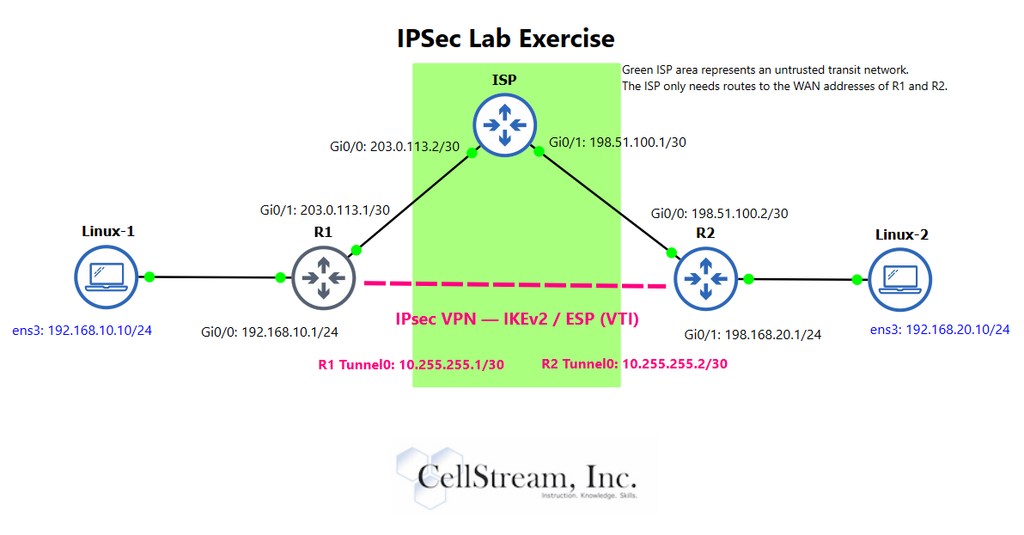
The lab consists of three Cisco IOSv routers and two Debian Linux clients.
R1 and R2 operate as IPsec VPN gateways. An intermediate ISP router represents an untrusted network connecting the two sites.
The private networks are:
- Site A:
192.168.10.0/24 - Site B:
192.168.20.0/24
The IPsec VPN uses IKEv2 with AES-256 encryption, SHA-256-based integrity protection, and Diffie-Hellman key exchange.
Rather than using traditional policy-based crypto maps, we configure a route-based VPN using IPsec Virtual Tunnel Interfaces.
This allows us to route traffic into the protected tunnel using conventional IPv4 routing.
An important part of the topology is that the ISP does not maintain routes to either private LAN. It only needs connectivity between the VPN gateway endpoints.
What Can We See in Wireshark?
One of the most interesting parts of the exercise is examining IPsec traffic at different locations in the network.
We capture packets on the private LAN connections and the intermediate ISP-facing WAN.
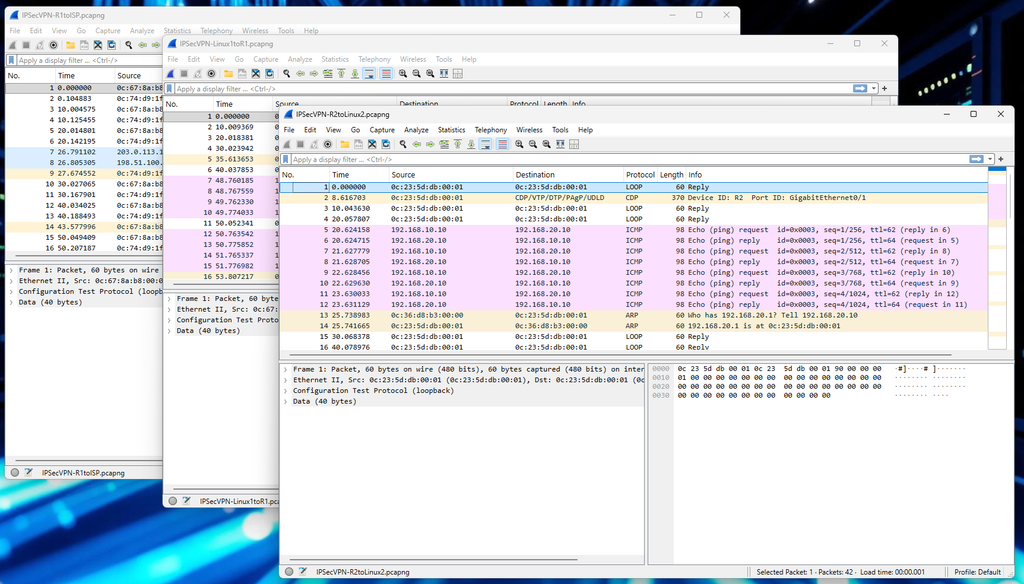
On the private LANs, we can see ordinary ICMP Echo Requests and Echo Replies between the Linux clients.
Across the ISP, those same communications are carried within encrypted ESP packets. The original private client addresses are protected within the tunnel-mode encapsulation.
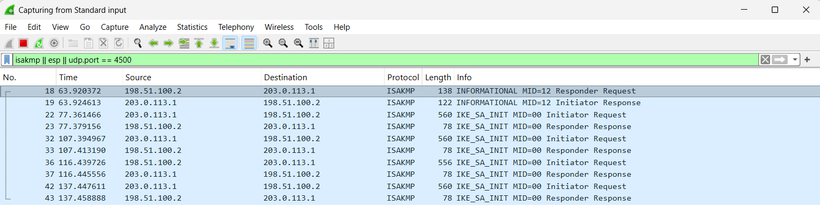
Wireshark also allows us to observe the IKEv2 negotiation process.
We examine the IKE_SA_INIT exchange, identify the negotiated encryption and integrity algorithms, inspect Diffie-Hellman parameters, and observe the encrypted IKE_AUTH exchange.
We then correlate the ESP Security Parameter Index (SPI) values displayed in Wireshark with the inbound and outbound Security Associations reported by Cisco IOS.
This provides a practical connection between what we configure on a router and what actually happens on the wire.
What Happens When the VPN Fails?
Configuring a successful VPN is useful. Understanding why one fails is even more important.
Our updated lab includes three controlled troubleshooting experiments.
1. Incorrect Pre-Shared Key
We deliberately configure different authentication keys on the two VPN gateways.
The initial IKEv2 negotiation progresses, but authentication fails during IKE_AUTH.
Cisco IOS reports an authentication error, which we correlate with the Wireshark capture.
2. Incompatible Cryptographic Proposals
We configure incompatible encryption algorithms on the two gateways.
This time, negotiation fails during IKE_SA_INIT.
Wireshark reveals an IKEv2 NO_PROPOSAL_CHOSEN notification, while Cisco IOS identifies the incompatible cryptographic policies.
3. Missing Return Route
Perhaps the most interesting experiment is one where the IKEv2 and IPsec Security Associations remain fully operational, but the applications cannot communicate.
By removing a return route on one VPN gateway, we demonstrate that encrypted packets can successfully reach the remote network while the replies fail to return.
Wireshark shows the arriving ICMP Echo Requests, generated Echo Replies, and ICMP Destination Unreachable messages.
This is an important troubleshooting lesson: an IPsec VPN can be established and healthy from a cryptographic perspective while still failing to carry application traffic successfully.
Try the Complete IPsec Lab
The complete, step-by-step IPsec Site-to-Site VPN Lab Experiment Using IKEv2 and GNS3 is available through the CellStream Patreon community.
The exercise includes:
- A downloadable GNS3 student topology.
- Cisco IOSv and Linux configuration procedures.
- IKEv2 proposals, policies, keyrings, and profiles.
- ESP transform sets and IPsec Virtual Tunnel Interfaces.
- Routing and encrypted traffic verification.
- Detailed Wireshark packet-analysis exercises.
- Three guided troubleshooting scenarios.
- Verification commands, expected observations, and review questions.
The lab was built and tested using Cisco IOSv 15.7(3)M3 and Debian Linux, with Wireshark used to verify the protocol exchanges and encrypted packet flows.
Access the Complete IPsec VPN Lab on CellStream Patreon
If you want to move beyond knowing which commands configure an IPsec VPN and develop a better understanding of its underlying operation, this experiment provides a practical way to do exactly that.
As we frequently emphasize at CellStream, successful network troubleshooting begins with understanding the protocols and observing what actually happens on the network.
Instruction. Knowledge. Skills.
If you would like to help support the continued development of independent networking, broadband, Wi-Fi, VoIP, and packet analysis content, please consider joining our Patreon community where you will gain access to exclusive technical resources, downloadable labs and PCAPs, bonus course content, troubleshooting guides, and additional member-only material. Comments and technical discussion are always welcomed at our Patreon community or on our Discord server. You can also support our work by simply buying us a coffee — every contribution helps us continue creating practical, real-world network science education for professionals and enthusiasts alike.