
Before anything, I want to thank my user @LeoRegem on Discord for providing the information below. Thank you! Join us there is you want to comment.
Here are the steps for capturing WLAN Wi-Fi packets on Android (basically getting into monitor mode and selecting channels, etc):
- Search for Network Analyzer on play store by Jiri Techet (9MB for android),
- Download and give location permission (needed for scanning wi-fi networks),
- Open app (no login or account creation required),
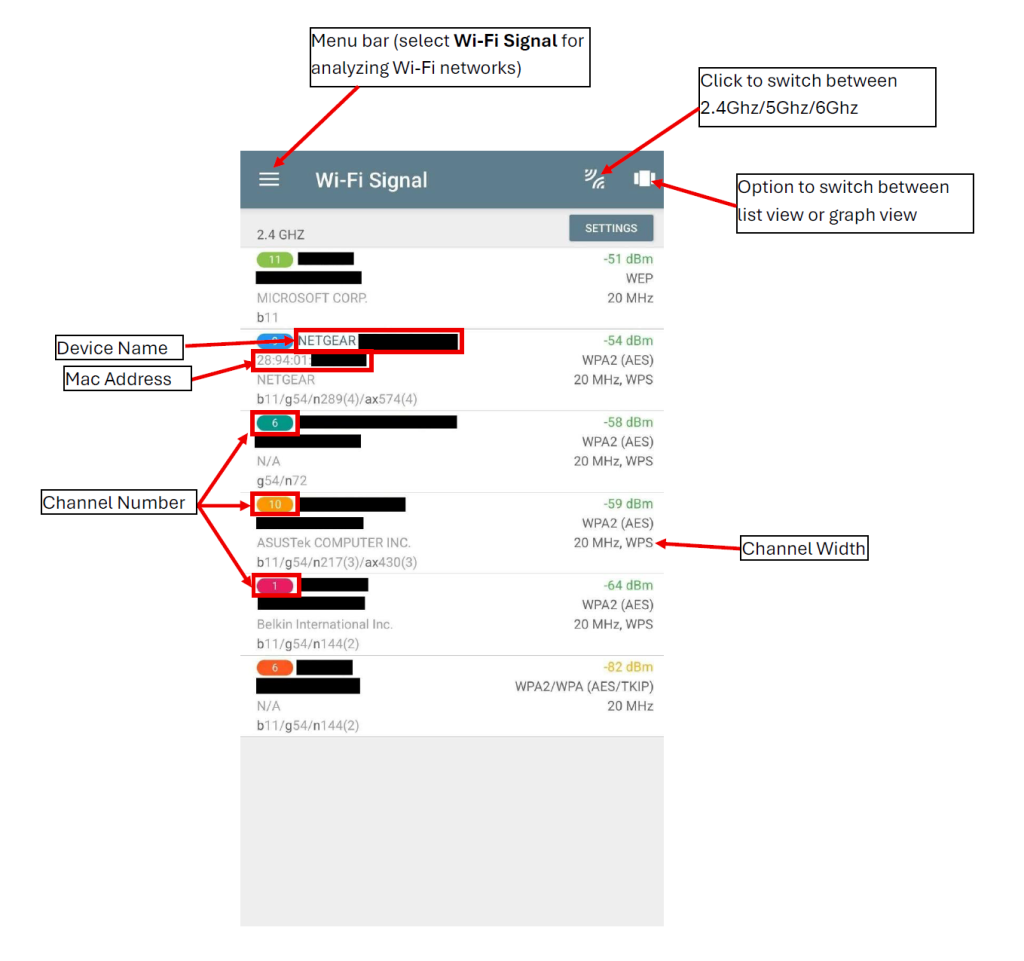
- Click on three bars on top-left, this will open a menu bar, select “Wi-Fi Signal”.,
- You should right away see 2.4Ghz devices around you.,
- Users can also switch between 5GHZ, and 6Ghz signal via the option on top right. Also view channels in graph form in their respective channels via a second option at top right.
Once you have this set, you can capture on the selected channel!! Have fun!
Comments are welcomed below from registered users. You can also leave comments at our Discord server.
If you would like to see more content and articles like this, please support us by clicking the patron link where you will receive free bonus access to courses and more, or simply buying us a cup of coffee!