

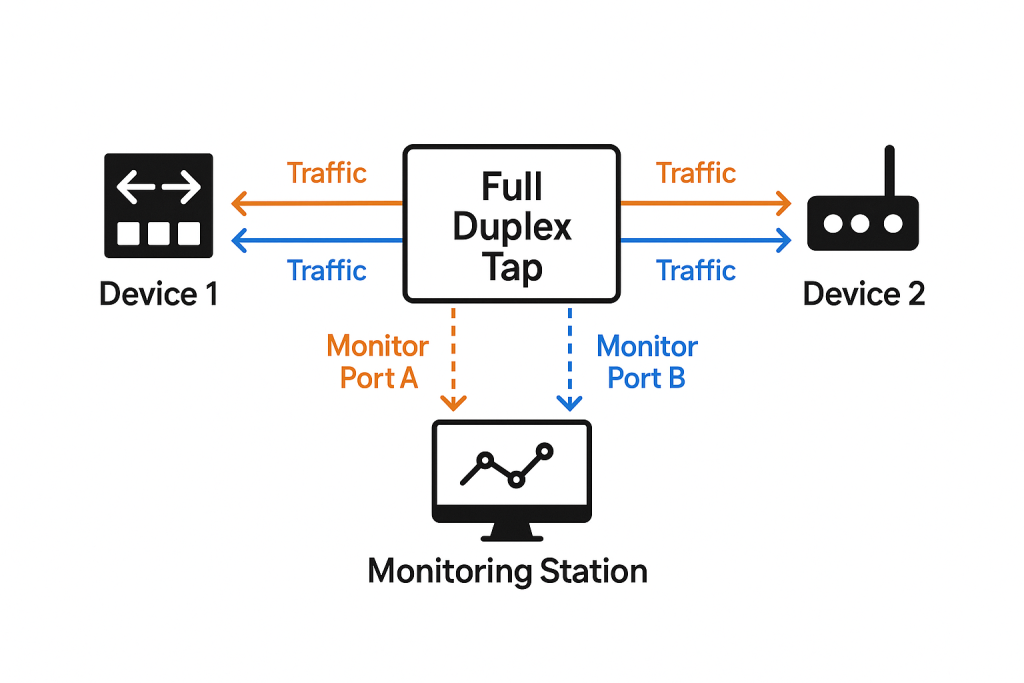
Many technicians and network engineering staff, as well as IT staff, often need to “tap” into the Ethernet to capture and troubleshoot network traffic. A full-duplex tap (also called a network tap) is a hardware device placed inline on an Ethernet link that allows network engineers to capture all traffic traveling in both directions — simultaneously — without interfering with the network connection. Network engineers need to tap into Ethernet to capture and troubleshoot traffic because it gives them direct, unfiltered visibility into what is actually happening on the network at the packet level. These devices are often called “full duplex taps”.
Let’s break that down what a full duplex tap is:
What “Full Duplex” Means
Modern Ethernet links are full duplex, meaning that:
- One device can send traffic (TX) while
- The other device simultaneously receives traffic (RX).
So there are two independent data streams — one in each direction — that travel over separate wire pairs.
How a Full-Duplex Tap Works
A full-duplex tap sits physically between two network devices — for example, between a switch and a router. It:
- Passively splits the electrical or optical signal from each direction of the Ethernet link.
- Sends a copy of each direction’s traffic to dedicated monitoring ports.
- Keeps the original link running without introducing delay or modification.
Why It’s Needed
Because full-duplex Ethernet transmits in both directions simultaneously, a single network interface cannot capture both streams natively — it only sees traffic in one direction.
A full-duplex tap ensures complete packet visibility:
- Every frame from both sides is captured.
- No collisions, drops, or half-duplex interference.
- Capture fidelity suitable for troubleshooting, timing analysis, or legal forensics.
If you need to tap into Wireless LAN traffic, you need other methods and that is in articles discussed here.
Once network traffic has been tapped, a tool like Wireshark can be used to capture and study the captured traffic as discussed elsewhere on this site.
Here is why we want to tap into Ethernet traffic:
1. True View of Network Behavior
Ethernet taps (or SPAN/mirror ports) allow engineers to see every frame and packet as it travels across the wire. This provides an accurate, real-time picture of communications between devices — including errors, retransmissions, and malformed packets — that higher-layer tools may hide or summarize.
2. Root Cause Troubleshooting
When performance issues, security incidents, or connectivity failures arise, engineers must determine whether the problem originates in the network, application, or endpoint. By examining the actual Ethernet and IP frames, they can pinpoint:
- Latency or jitter issues
- Packet loss or duplication
- Misconfigured VLANs or MTUs
- Handshake or timing problems between systems
3. Independence from Endpoints
Capturing traffic from an Ethernet tap doesn’t rely on any device’s internal logging or software. This ensures the data is neutral and trustworthy, unaffected by host biases or missing logs. Engineers can analyze traffic even when endpoints are malfunctioning or compromised.
4. Security and Forensics
In cybersecurity, taps allow full packet capture (PCAP) for forensic analysis. Engineers and analysts can reconstruct sessions, detect anomalies, and investigate attacks — such as man-in-the-middle attempts, malware command-and-control, or exfiltration of data.
5. Nonintrusive Monitoring
Ethernet taps are usually passive devices — they don’t alter the traffic. This makes them ideal for production environments where inserting active devices or interrupting traffic is unacceptable.
In short, tapping Ethernet gives network engineers the raw, complete truth about network activity — something that’s critical for performance tuning, security, and reliability.
So what tools do I need to accomplish this task? There are plusses and minuses (cheaper works, but has certain drawbacks) to all the items listed below. We would love to hear if we are missing any that readers like.
Here is a list of suggested tools for technicians to carry that will work up to 1G and their approximate cost (please use the Amazon links as we earn a small commission – thank you):
| Product Name/Link | Brief Description | Approximate Cost/Notes |
| Dualcomm10/100/1000Base-T Gigabit Ethernet Network TAP [ETAP-2003] | Network Tap for use with 10/100/1000Base-T Ethernet link Reliable and high performance. Tested with maximum in-line cable length (200m) at full 1Gbps data throughput with no single packet loss Capable of being powered from a computer’s USB port with built-in inrush current limiting circuit to prevent the computer from possible damages or disturbances by instantaneous current surge Compatible with Power-over-Ethernet (PoE) Probably the smallest portable GbE Network Tap available on the market | $230 |
| 10/100/1000 Gigabit Ethernet/USB Bypass Network Tap | (10/100/1G) Gigabit Bypass network tap / sniffer equivalent to port mirror on a switch. The two monitor/sniff ports are isolated from the network being monitored. Automatic bypass of device on power fail. Power-over-Ethernet (POE) pass-through. Rated at .75A max at 57vdc 5v power through USB3 port or 5v wall transformer (or both). ~500ma consumption. | $200 |
| ETAP-1000 Zero-Delay Fast Ethernet Copper Tap | Network Tap for use with a 100Base-T Fast Ethernet copper link w/ zero packet delay Single gigabit monitor port Capable of being powered from a computer’s USB port with built-in inrush current limiting circuit to prevent the computer from possible damages or disturbances by instantaneous current surge Compatible with Power over Ethernet (PoE) Support power fail-safe and Link Fault Pass-Through | $480 |
| ETAP-2206 Dual-Link GbE Copper & Fiber Ethernet Network Tap | Network Tap for monitoring GbE copper & fiber links simultaneously with a single monitor port. SFP interface for monitoring a fiber gigabit Ethernet link (1000Base-X) Capable of being powered from a computer’s USB port with built-in inrush current limiting circuit to prevent the computer from possible damages or disturbances by transitional high current flow PoE pass-through, compatible with Power over Ethernet (PoE) Stackable to enable capturing traffic of multiple links with a single monitor port | $980 |
| Throwing Star LAN Tap | Throwing Star LAN Tap is a small, simple device for monitoring Ethernet communications Use Ethernet cables to connect the Throwing Star LAN Tap (J1 and J4) in line with a target network to be monitored. Use Ethernet cables to connect one or both of the monitoring ports (J3 and J6) to ports on one or two monitoring stations. Each port monitors traffic in one direction only Use your favorite software (e.g., tcpdump or Wireshark) on the monitoring station(s) to capture network traffic The Throwing Star LAN Tap is a passive Ethernet tap, requiring no power for operation. There are active methods of tapping Ethernet connections (e.g., a mirror port on a switch), but none can beat passive taps for portability. To the target network, the Throwing Star LAN Tap looks just like a section of cable, but the wires in the cable extend to the monitoring ports in addition to connecting one target port to the other | $11 This is the cheapest option that will likely work. |
| SharkTapUSB Ethernet Sniffer | Ethernet Test Access Port that does not require an ethernet port, for thin notebook or netbook PCs. Uses USB 3 or USB 2 port on PC (Also provides a CAT-5 TAP port) A ‘Test Access Port’ allows you to see the packets on an ethernet link. Directly supports 10-, 100- or 1000Base-T links. Intended to be used with the open source Wireshark program, or equivalent. The Gen2 SharkTapUSB features ‘carbon copy’ copper repeater technology for minimum impact on the monitored network. The carbon copies of bi-directional data are aggregated onto a single wired or USB Test Access Port (TAP) Power-over-ethernet pass through. (For power-fail bypass, search “SharkTapBYP”) 400mA current. Non-conductive plastic cover. Auto cross-over for cables. USB3 cable included | $270 I have this one in my “Go Bag” |
| Gigabit Ethernet Splitter 1 to 2 – Network Splitter with USB Power Cable, RJ45 Internet Adapter 1000Mbps High Speed for Cat 5/5e/6/7/8 Cable | 【ETHERNET SPLITTER】LIEZHUA Gigabit Ethernet Splitter 1 in 2 provides you with an efficient network expansion solution. With this device, you can quickly expand a single network splitter port to two, enabling two devices to transfer data simultaneously at high speeds of up to 1,000 Mbps. Power connection required. (Additionally, the device is equipped with six LED indicators that make it easy for you to accurately determine which connected device is currently running) 【SIMULTANEOUSLY CONNECT DUAL DEVICES】With the help of this ethernet splitter high speed, you can simultaneously connect and network two devices, optimizing the utilization of your network resources and enhancing the stability of their connections. Farewell to connection problems caused by insufficient cabling. It is a simple and efficient network splitter that helps you expand your network ports. Note: Two Female Port Workable Simultaneously 【UNIVERSAL COMPATIBILITY】Whether you are using Cat 5, 5e, 6, 7 or 8 Ethernet cables, this rj45 splitter 1 to 2 can handle it easily. Its wide compatibility is suitable for various network environments, such as working with ADSL, hubs, switches, TVs, set-top boxes, routers, wireless devices, computers and so on. Gigabit Ethernet adapter are small, providing more flexibility for your network expansion plans, switch compatible with various operating systems 【EASY TO USE 】The included USB power cable offers the convenience of a ethernet splitter 1 to 2 that just plug it into a 5V/1A DC power source and it will work. This dual ethernet splitter simplifies the installation process and reduces confusion around network setup. [Note: It is recommended to use a 5V 1A/2A USB charging head for power supply, and the internet switch cannot be used when not connected.] | $14 Splitters like this are not full duplex taps, but they can get the job done if you filter out the traffic from the connected packet capture device. |
| TP-Link 8 Port Gigabit Switch | Easy Smart Managed | Plug & Play | Desktop/Wall-Mount | Sturdy Metal w/ Shielded Ports | Support QoS, Vlan, IGMP and LAG (TL-SG108E) | 𝟴 𝗚𝗶𝗴𝗮𝗯𝗶𝘁 𝗘𝘁𝗵𝗲𝗿𝗻𝗲𝘁 𝗣𝗼𝗿𝘁𝘀: expand your network with 8 high-speed ethernet ports 𝗘𝗮𝘀𝘆 𝗦𝗺𝗮𝗿𝘁 𝗠𝗮𝗻𝗮𝗴𝗲𝗺𝗲𝗻𝘁: Manage and configure your network effortlessly via a web interface/free software 𝗦𝘂𝗽𝗽𝗼𝗿𝘁 𝗩𝗟𝗔𝗡: Segment traffic with up to 32 VLANs simultaneously (out of 4K VLAN IDs) for better security 𝗡𝗲𝘁𝘄𝗼𝗿𝗸 𝗠𝗼𝗻𝗶𝘁𝗼𝗿𝗶𝗻𝗴: Monitor your network effectively with port mirroring, loop prevention, and cable diagnostics 𝗜𝗚𝗠𝗣 𝗦𝗻𝗼𝗼𝗽𝗶𝗻𝗴: Enhances multicast application performance 𝗦𝘂𝗽𝗽𝗼𝗿𝘁 𝗤𝗼𝗦: Optimize traffic flow for various applications 𝗟𝗮𝘆𝗲𝗿 𝟮 𝗙𝗲𝗮𝘁𝘂𝗿𝗲𝘀: Enhance network efficiency and security with features like Link Aggregation, Port Mirroring, IGMP Snooping, and Loop Prevention | $25 This is a great option. A small switch with port mirroring capability. |
| NETGEAR 8 Port PoE Gigabit Ethernet Easy Smart Managed Essentials Switch (GS308EP) | 8 Gigabit Ethernet ports 8 PoE+ ports with 62W total power budget Easy Smart Managed Essentials software with easy-to-use interface offers basic managed capabilities to configure, secure, and monitor your network Supports desktop or wall mount placement Industry-leading 3-year limited hardware warranty | $70 Another great option, if not just a bit more money. |
For higher that 1Gig speeds, you will end up spending more money. Here are some examples that I suggest you contact directly for products and pricing (we are not sponsored by any of these companies):
| Vendor | Speed Range | Tap Type | Key Feature |
|---|---|---|---|
| Garland Technology | 1G–100G | Copper/Fiber | Fail-safe passive design |
| Ixia / Keysight | 1G–400G | Copper/Fiber | Precision optical ratios |
| Profitap | 1G–100G | Copper/Fiber | Time-stamping, PoE support |
| Datacom Systems | 1G–40G | Copper/Fiber | Multi-port & aggregation |
| Dualcomm | 1G–10G | Copper/Fiber | Compact, cost-effective |
Comments are welcomed below from registered users. You can also leave comments at our Discord server.
If you would like to see more content and articles like this, please support us by clicking the patron link where you will receive free bonus access to courses and more, or simply buying us a cup of coffee!