

The 169.254.x.x IPv4 address is called the APIPA address. APIPA stands for Automatic Private IP Addressing. It’s a fallback mechanism built into Windows (and most modern operating systems) to give your network interface a “link local” address when it can’t get one from a DHCP server. The APIPA IPv4 Addresses are any address in this range:
169.254.0.0 – 169.254.255.255 with a mask of 255.255.0.0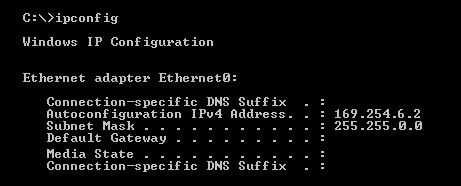
If you see something like 169.254.32.15 or in the above example 169.254.6.2, it’s an APIPA address. This is a local address that is not “routable”. When we say an APIPA address (169.254.x.x) is “not routable,” it means: Routers will never forward traffic from or to 169.254.x.x networks. More precisely:
- The 169.254.0.0/16 block is reserved by IANA strictly for link-local networking only.
- Routers are required (by standards) to drop any packet with a source or destination in that range.
- No routing table—static or dynamic—will EVER include a 169.254 route.
- APIPA traffic stays strictly on the local layer-2 network (your switch or Wi-Fi AP).
So APIPA exists only to let devices talk on the same local network when DHCP is down. For example: Two laptops plugged into the same unmanaged switch, both fail DHCP → they get APIPA → they can still talk to each other locally because they are on the same L2 LAN or VLAN.
APIPA was never intended to reach:
- Your router
- The internet
- Another VLAN
- Another subnet
- Any routed network
Because of that purpose, APIPA ranges are blocked from routing by design.
Why does an interface have and APIPA Address?
You get an APIPA address when:
- Your device is set to obtain an IP automatically (DHCP), but it can’t reach a DHCP server.
- Here are Examples:
- Ethernet cable unplugged
- Bad Wi-Fi connection
- DHCP server down (router not responding)
- VLAN misconfiguration
- Wrong switch port, wrong network, or no DHCP relay
- Firewall blocking DHCP broadcasts
When DHCP fails, Windows assigns 169.254.x.x so the interface isn’t completely “dead”. That said, having an APIPA address helps in certain ways. Let’s look at what having an APIPA address assigned allows and doesn’t allow:
What APIPA allows
Even though it’s not routable on real networks:
- Devices on the same LAN segment or VLAN that also have APIPA can talk to each other.
- You can do very basic local communication (e.g., two PCs plugged directly into each other).
It’s basically “local-only survival mode.”
What APIPA does NOT allow
- No internet access
- No communication across routers
- No access to other subnets
- No normal LAN communication (unless the other device is also APIPA)
OK, how do I tell if DHCP is failing?
If you run:
ipconfig…and see:
Autoconfiguration IPv4 Address . . . : 169.254.x.x
Subnet Mask . . . . . . . . . . . . : 255.255.0.0
Your DHCP requests have failed.
How do I fix APIPA (DHCP failure)
Try the following:
ipconfig /releaseipconfig /renew
→ If it still gets APIPA, DHCP isn’t reachable.- Check cable / Wi-Fi connection.
- Check if the router/switch is providing DHCP.
- Verify VLAN, trunk, or relay settings if on a managed network.
APIPA was created to give IPv4 a “link-local” capability similar to IPv6 link-local addresses. But APIPA was invented long before IPv6 became widely deployed, and the two systems work differently.
Key Differences between IPv4 APIPA and IPv6 Link Local
| Feature | APIPA (IPv4) | IPv6 Link-Local |
|---|---|---|
| Range | 169.254.0.0/16 | fe80::/10 |
| Always present? | ❌ No, only if DHCP fails | ✅ Yes, always |
| Routing | ❌ Never routed | ❌ Never routed |
| Required for protocol operation | ❌ No | ✅ Yes (ND, RA, DHCPv6) |
| Uniqueness | Duplicate detection optional | Duplicate Address Detection required |
| Purpose | Emergency fallback | Fundamental IPv6 operation |
Comments are welcomed below from registered users. You can also leave comments at our Discord server.
If you would like to see more content and articles like this, please support us by clicking the patron link where you will receive free bonus access to courses and more, or simply buying us a cup of coffee!