

This question was sent to me in an email following my posts on regarding TCP CUBIC. The answer is Yes—Microsoft Windows does support TCP CUBIC, but the nuance is in how and when it’s used.
For many years, Windows defaulted to Compound TCP (CTCP) rather than CUBIC. Meanwhile, Linux distributions standardized on TCP CUBIC, which is why CUBIC became dominant across the Internet.
Starting with newer builds of Windows 10 and fully in Windows 11, Microsoft added native support for TCP CUBIC in the TCP/IP stack.
- CUBIC is available as a congestion control provider
- It is not always the default, depending on version and configuration
- That said, it can be enabled manually
Checking and Enabling TCP CUBIC
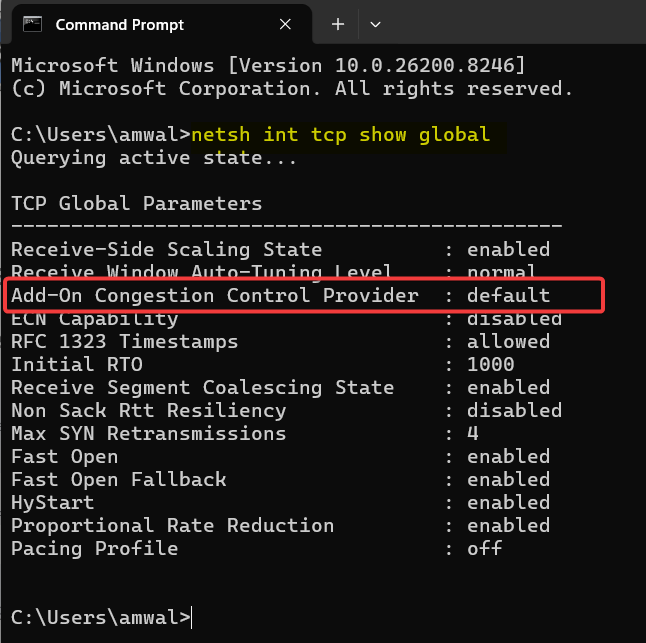
Check current congestion provider:
netsh int tcp show global
Look for:
Congestion Provider : <value>
Here is what I got, I am running Windows 11, but it was an update to Windows 10 on my now aging machine:
Enable TCP CUBIC:
This time you have to run CMD in administrator mode:
netsh int tcp set supplemental template=internet congestionprovider=cubic
This switches the system to use CUBIC for general Internet traffic if it is not defaulted already. Mine was, so no change necessary.
Where CUBIC Is Actually Used in Windows
Even more important from a modern networking perspective:
- Keep in mind that HTTP/3 and QUIC-based traffic (e.g., in browsers like Chrome/Edge) does not use TCP at all
- QUIC uses its own congestion control (often CUBIC-like or BBR-like algorithms implemented in user space)
So in real-world traffic traditional TCP flows may use CUBIC if enabled. Modern web traffic often bypasses TCP entirely via QUIC.
Why Microsoft Added CUBIC
As explained in my article (link above) CUBIC is better suited for High Bandwidth-Delay Product (BDP) paths, long fat networks (LFNs), and faster recovery after loss compared to Reno/CTCP. This aligns Windows with the Linux defaults and with Internet-wide congestion control behavior.
I hope that answers the question. Thanks to those who commented.
If you would like to help support the continued development of independent networking, broadband, Wi-Fi, VoIP, and packet analysis content, please consider joining our Patreon community where you will gain access to exclusive technical resources, downloadable labs and PCAPs, bonus course content, troubleshooting guides, and additional member-only material. Comments and technical discussion are always welcomed at our Patreon community or on our Discord server. You can also support our work by simply buying us a coffee — every contribution helps us continue creating practical, real-world network science education for professionals and enthusiasts alike.