

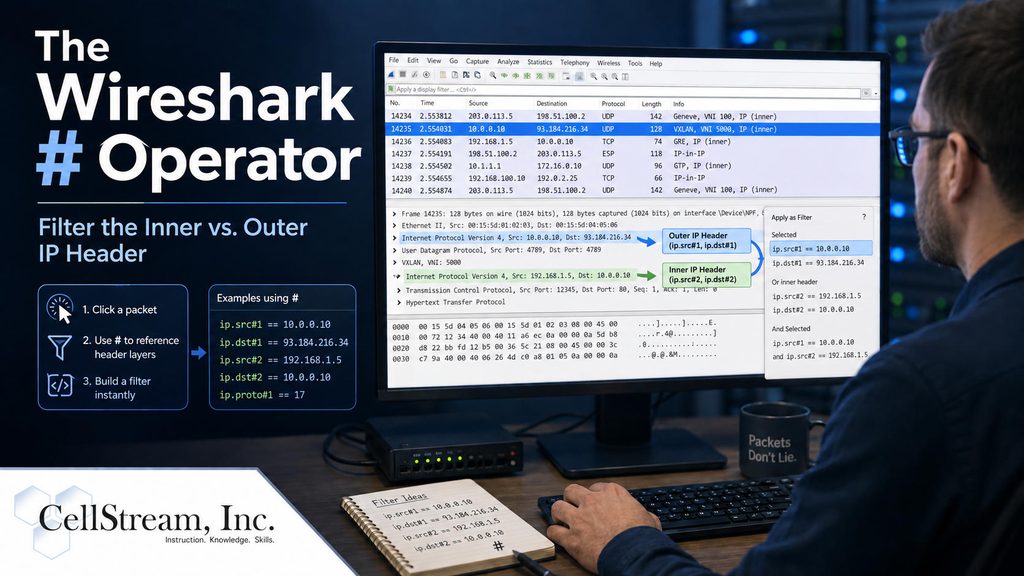
Most Wireshark filters assume there is only one IP header in a packet.
For example:
ip.src == 10.1.1.10
works perfectly well in ordinary traffic.
But what happens when the packet contains more than one IP header?
That is common with technologies such as:
- GRE
- VXLAN
- IP-in-IP
- VPNs
- Overlay networks
- Some ICMP error messages
A tunneled packet might look like this structure:
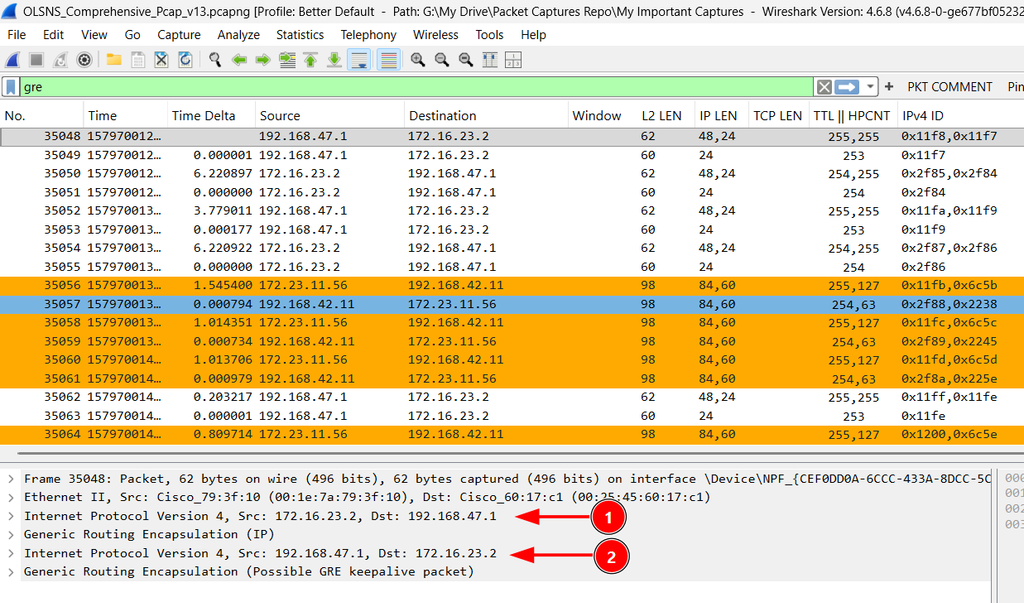
Ethernet
   IPv4 (outer)
      GRE
         IPv4 (inner)
            TCP
Now we have an outer IPv4 header and an inner IPv4 header.
So which one does ip.src refer to?
Meet the Wireshark # Operator
Wireshark includes a Layer Operator that lets you specify which occurrence of a protocol field you want to examine.
For example:
ip.src#1
refers to the IPv4 source address in the first IPv4 layer.
And:
ip.src#2
refers to the IPv4 source address in the second IPv4 layer.
So a tunneled packet might contain:
Outer:
192.0.2.10 → 192.0.2.20

Inner:
10.1.1.10 → 10.2.2.20
You could specifically filter the tunnel endpoints with:
ip.src#1 == 192.0.2.10
Or filter the encapsulated traffic with:
ip.src#2 == 10.1.1.10
That is a much more precise way to analyze tunneled traffic.
Don’t Confuse #2 With OSI Layer 2
The number after the # does not refer to the OSI model.
ip.src#2
means:
the IPv4 source field from the second occurrence of the IPv4 protocol in the packet.
That distinction is important.
Why This Is Useful With VXLAN
VXLAN is a great example because a captured packet may contain:
Outer Ethernet
   Outer IP
      UDP
         VXLAN
            Inner Ethernet
               Inner IP
                  TCP
The outer addresses identify the VTEPs transporting the VXLAN traffic.
The inner addresses identify the actual communicating workloads.
Using:
ip.addr#1
lets you focus on the underlay.
Using:
ip.addr#2
lets you focus on the overlay traffic inside the tunnel.
That can make it much easier to answer an important troubleshooting question:
Is the problem in the network carrying the tunnel, or in the traffic being carried inside it?
A Few Filters to Try
Outer IPv4 source
ip.src#1 == 192.0.2.10
Inner IPv4 source
ip.src#2 == 10.1.1.10
Outer IPv4 conversation
ip.addr#1 == 192.0.2.10
Inner IPv4 conversation
ip.addr#2 == 10.1.1.10
VXLAN traffic involving an inner host
vxlan && ip.addr#2 == 10.1.1.10
These simple filters are enough to demonstrate just how useful the # operator can be.
There Is Much More You Can Do
The Layer Operator isn’t limited to IP addresses.
It can also be used with other repeated fields, including things such as:
- TTL
- DSCP
- protocol fields
- transport fields
- multiple levels of encapsulation
You can even use layer ranges and build custom Wireshark columns that separately display outer and inner addressing.
That is where this feature becomes especially useful for GRE, VXLAN, service-provider, and data-center troubleshooting.
In the full Patreon article, I go deeper into the # operator with GRE, VXLAN, ICMP, nested encapsulation, layer ranges, TTL and DSCP comparisons, and custom inner/outer header columns.
Continue with the complete Wireshark # Operator tutorial on Patreon
If you would like to help support the continued development of independent networking, broadband, Wi-Fi, VoIP, and packet analysis content, please consider joining our Patreon community where you will gain access to exclusive technical resources, downloadable labs and PCAPs, bonus course content, troubleshooting guides, and additional member-only material. Comments and technical discussion are always welcomed at our Patreon community or on our Discord server. You can also support our work by simply buying us a coffee — every contribution helps us continue creating practical, real-world network science education for professionals and enthusiasts alike.