

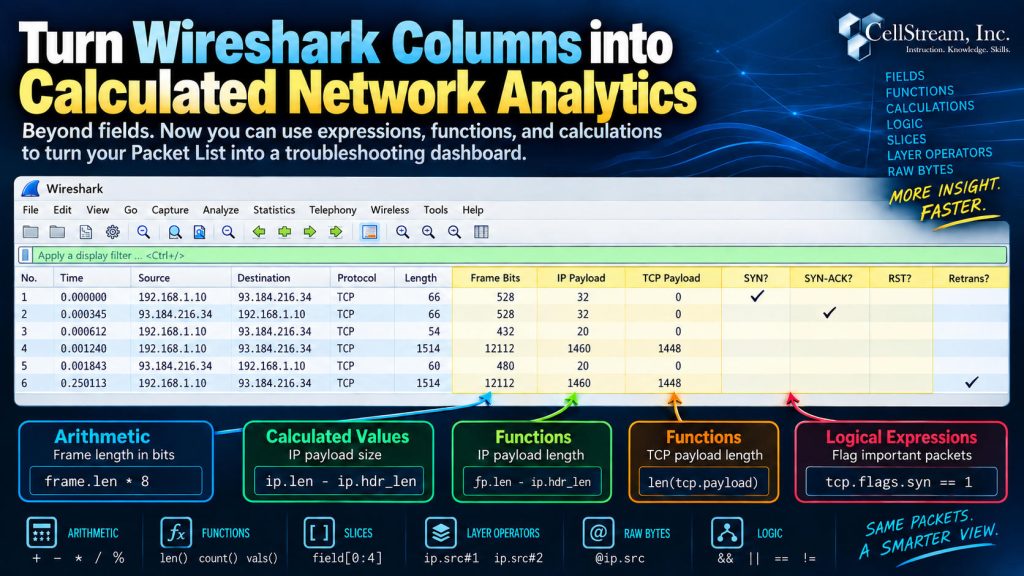
Most Wireshark users eventually discover Custom Columns.
Instead of being limited to the standard Source, Destination, Protocol, Length, and Info columns, you can add useful fields such as:
tcp.stream
tcp.analysis.ack_rtt
dns.qry.name
vlan.id
That alone can make packet analysis much easier.
But in newer versions of Wireshark, Custom Columns can do much more than simply display a protocol field.
They can contain expressions.
That means a column can perform calculations, use functions, test conditions, and derive new information directly from packet data.
In other words, your Wireshark Packet List can start doing some analysis for you.
A Simple Example: Convert Bytes to Bits
Wireshark normally displays frame length in bytes using:
frame.len
But suppose you would rather see the frame size in bits.
Create a Custom Column using:
frame.len * 8
Now Wireshark calculates the value for every packet.
A 1514-byte frame becomes:
12112
bits.
This is a simple example, but it demonstrates an important change.
The column is no longer just displaying a field.
It is calculating a result.
Calculate the IPv4 Payload Size
You can also combine multiple fields.
For example:
ip.len - ip.hdr_len
subtracts the IPv4 header length from the total IPv4 packet length.
The result is the amount of data being carried by IPv4.
That could become a column called:
IP Payload
Now Wireshark is deriving a value that you specifically want to see during troubleshooting.
Use Functions in Custom Columns
Wireshark’s display-filter functions can also be used in these expressions.
For example:
len(tcp.payload)
returns the number of bytes in the TCP payload.
Create a column called:
TCP Payload
and packets carrying TCP application data can immediately show the payload size in the Packet List.
No need to expand the TCP header or inspect the Packet Details pane for every packet.
Create Troubleshooting Indicator Columns
This is where the feature becomes especially interesting.
A Custom Column can contain a logical test.
For example:
tcp.flags.reset == 1
Create a column called:
RST?
When a packet contains a TCP Reset, Wireshark can visually indicate that condition directly in the Packet List.
You could do the same for an initial SYN:
tcp.flags.syn == 1 && tcp.flags.ack == 0
and call that column:
SYN?
Or:
tcp.flags.syn == 1 && tcp.flags.ack == 1
for:
SYN-ACK?
Now imagine looking at a TCP conversation with columns such as:
- TCP Stream
- SYN?
- SYN-ACK?
- RST?
- TCP Payload
- ACK RTT
Instead of filtering away packets to find certain conditions, you can leave the entire conversation visible and let the columns identify packets that deserve attention.
That preserves something extremely important in packet troubleshooting:
context.
Columns Can Become Part of the Analysis
This changes the way I think about Wireshark Configuration Profiles.
Traditionally, we build profiles by choosing which protocol fields we want to see.
Now we can also ask:
What do I want Wireshark to calculate for me?
A TCP troubleshooting profile might calculate packet conditions.
A VXLAN profile might separate inner and outer addressing.
A protocol-research profile might expose particular payload bytes.
A service-provider Ethernet profile might count VLAN tags.
The Packet List can become much more than a list of packets.
It can begin acting like a troubleshooting dashboard.
There Is Much More You Can Do
The examples above only scratch the surface.
Current Wireshark versions allow Custom Column expressions to use capabilities including:
- arithmetic
- functions
- logical expressions
- packet slices
- field counting
- raw-byte addressing
- protocol-layer selection
- combinations of these techniques
That opens up some very interesting possibilities for advanced packet analysis.
In the full Patreon article, I go much deeper into calculated Custom Columns, including field counting, VLAN tag counting, byte slicing, raw-field access, retransmission indicators, inner-versus-outer IP headers, and examples of building purpose-designed troubleshooting profiles around calculated data.
If you would like to help support the continued development of independent networking, broadband, Wi-Fi, VoIP, and packet analysis content, please consider joining our Patreon community where you will gain access to exclusive technical resources, downloadable labs and PCAPs, bonus course content, troubleshooting guides, and additional member-only material. Comments and technical discussion are always welcomed at our Patreon community or on our Discord server. You can also support our work by simply buying us a coffee — every contribution helps us continue creating practical, real-world network science education for professionals and enthusiasts alike.