

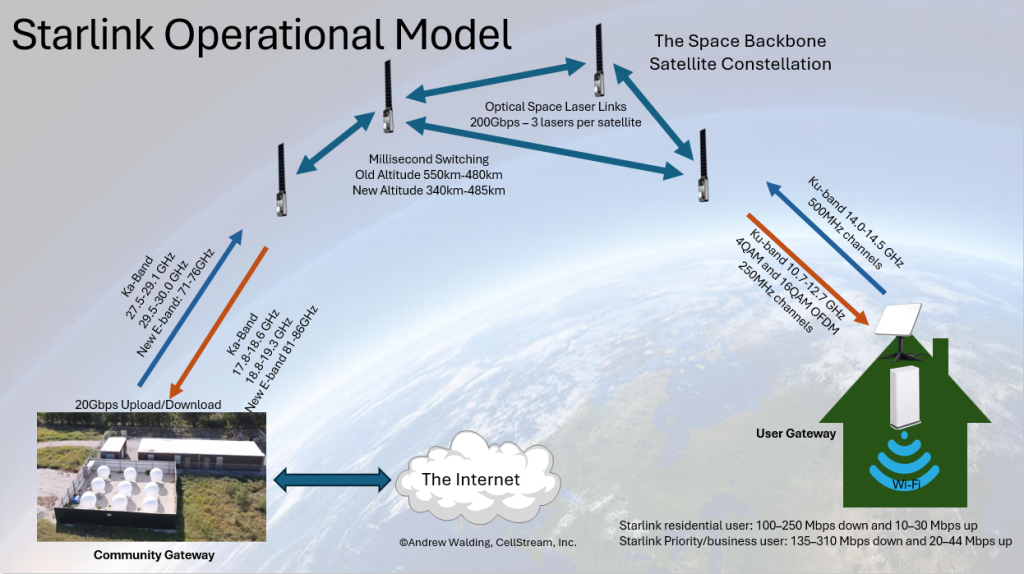
For many broadband folks, this is a question that you need to know the answer to. So let’s answer in a picture and with supporting data. Well, let’s just say this is as best as one can determine. Naturally there is an intellectual property barrier to what Starlink/SpaceX has and is developing. There are technology secrets – just like the actual recipe for Coca-Cola. So understand this is the best public knowledge that can be assembled at this time.
I have sketched the operational model in this graphic. That said here are some details:
Starlink involves 3 primary components:
- The Space Backbone Satellite Constellation
- The Community Gateways – the connection to the Internet
- The end User Gateways
I will begin with the Wireless Details, then I will discuss the throughput capabilities.
Wireless Details
Starlink end-user terminal frequencies
| Link direction | What the customer experiences | RF path | Frequency band |
|---|---|---|---|
| Satellite → user terminal | Download | Space-to-Earth Ku-band | 10.7–12.7 GHz |
| User terminal → satellite | Upload | Earth-to-space Ku-band | 14.0–14.5 GHz |
For the normal Starlink user dish, the downlink is in the Ku-band around 10.7–12.7 GHz, and the uplink is in the Ku-band around 14.0–14.5 GHz. NRAO’s coordinated Starlink user-terminal testing describes Starlink UT uplink use as 500 MHz from 14.0–14.5 GHz and downlink use as about 2 GHz from roughly 10.7–12.75 GHz, with dynamic channel switching. It also notes eight 250 MHz downlink channels starting at 10.7, 10.95, 11.2, 11.45, 11.7, 11.95, 12.2, and 12.45 GHz, and eight uplink channels across 14.0–14.5 GHz.
Starlink gateway / community gateway frequencies
| Link direction | What it means | RF path | Frequency band |
|---|---|---|---|
| Satellite → gateway | Gateway receive / downlink | Space-to-Earth Ka-band | 17.8–18.6 GHz, 18.8–19.3 GHz |
| Gateway → satellite | Gateway transmit / uplink | Earth-to-space Ka-band | 27.5–29.1 GHz, 29.5–30.0 GHz |
| Satellite → newer high-capacity gateway | E-band gateway receive | Space-to-Earth E-band | 71–76 GHz |
| Newer high-capacity gateway → satellite | E-band gateway transmit | Earth-to-space E-band | 81–86 GHz |
Starlink’s public Community Gateway page says Community Gateway traffic uses Starlink’s laser mesh and “high bandwidth Gateways operating in a dedicated Ka spectrum band,” with advertised capacity up to 20 Gbps down and 20 Gbps up. Recent FCC gateway authority for a Starlink site in Banning, California lists 27.5–29.1, 29.5–30.0, and 81–86 GHz Earth-to-space, and 17.8–18.6, 18.8–19.3, and 71–76 GHz space-to-Earth.
So, in plain terms: the End-user dish: Ku-band, and Starlink gateway / community gateway: primarily Ka-band, with E-band used on newer/high-capacity gateway infrastructure.
Modulation
This is the part where the public information is less complete. SpaceX does not publish a full open PHY specification for Starlink modulation, coding, scheduling, frame structure, or adaptive modulation behavior. A University of Texas signal-analysis paper explicitly notes that Starlink waveform and timing details were not publicly available, then reverse-engineers the Ku-band downlink.
For the Ku-band user downlink, independent signal analysis found Starlink uses an OFDM-based waveform. The observed Starlink downlink contained 4QAM and 16QAM OFDM modulation; 4QAM is effectively equivalent to QPSK in this context. The same paper describes frame structure where synchronization portions use 4QAM OFDM, and some early payload symbols may use 16QAM, with the remainder often 4QAM, depending on received SNR.
For the uplink and gateway links, the exact public modulation profile is not as well documented. FCC filings describe authorized emissions and bandwidths, but they do not give a clean public “Starlink uses X modulation on every uplink” answer. The safe technical statement is:
Starlink uses proprietary, adaptive digital satellite waveforms. The publicly measured user downlink is OFDM using QAM-family modulation, specifically observed as 4QAM/QPSK and 16QAM. Gateway and uplink links are digital, but the exact modulation and coding modes are not fully public.
Starlink optical inter-satellite links, known details
| Item | What is publicly known |
|---|---|
| Name | Optical Space Lasers, Optical Inter-Satellite Links, or OISLs/ISLs |
| Purpose | Satellite-to-satellite backhaul/routing inside the Starlink constellation |
| User-link replacement? | No. The customer dish still uses RF; the lasers are mainly satellite-to-satellite backbone links |
| Laser terminals per current satellite | Starlink’s technology page says each satellite contains 3 space lasers |
| Per-link capacity | Starlink says the space lasers operate at up to 200 Gbps |
| Network role | They create a global internet mesh in space |
| Public PHY details | Limited. Wavelength, optical modulation, FEC, framing, encryption, and routing implementation are not fully public |
Starlink’s own technology page says each satellite has 3 optical space lasers, also called Optical Intersatellite Links, operating at up to 200 Gbps and forming a global mesh across the constellation.
What they do in the network
The laser links let Starlink avoid being purely a “bent-pipe” satellite service. Instead of every satellite needing a direct view of both the user terminal and a nearby gateway earth station, a satellite can pass traffic to another satellite, and then another, until the traffic reaches a satellite with a usable path to a gateway. Reuters summarized this as Starlink satellites passing data between one another “at the speed of light,” allowing broader global coverage with fewer ground stations.
That matters most over:
- oceans
- polar regions
- aircraft and ships
- remote areas without nearby gateways
- regions where a direct gateway path is not available
A simple path might look like this:
User dish → Starlink satellite → laser link → laser link → gateway satellite → Starlink gateway → Internet
Performance figures that have been publicly reported
At SPIE Photonics West in 2024, SpaceX engineer Travis Brashears reportedly described a very large operational laser network: about 9,000 lasers, over 42 petabytes per day of customer data carried through the laser system, and the ability to sustain 100 Gbps per link, with some links reaching 200 Gbps.
Additional reported operating details include about 266,141 laser acquisitions per day, some links lasting weeks, links over 5,400 km, and laser routes that can be changed dynamically within milliseconds.
Link topology
The practical topology is a moving optical mesh. A satellite can establish links with satellites in the same orbital plane and with satellites in different orbital planes. Academic work on Starlink-style laser inter-satellite links distinguishes between more stable same-plane links and more temporary links between crossing or adjacent orbital planes.
Conceptually:
Same orbital plane:
Sat A ⇄ Sat B ⇄ Sat C ⇄ Sat D

Adjacent orbital planes:
        Sat X ⇄ Sat Y
          ⇅      ⇅
Sat A ⇄ Sat B ⇄ Sat C
The same-plane links are easier to maintain because the satellites have more predictable relative motion. Cross-plane links are more dynamic because relative geometry changes faster.
Optical versus RF
These are not Ku-band, Ka-band, or E-band RF links. They are free-space optical links, meaning the carrier is light, not radio. In practical terms, the lasers are extremely narrow-beam optical point-to-point links. That gives them high capacity and low probability of interception compared with broad RF beams, but it also requires very accurate pointing, acquisition, and tracking.
The hard engineering problem is not just “turn on a laser.” It is:
- know where the target satellite is,
- point the optical terminal precisely,
- acquire the remote terminal,
- track it while both satellites are moving,
- maintain link margin,
- reroute when geometry changes.
What is not publicly specified
The following are not cleanly published as an open Starlink specification:
| Detail | Public status |
|---|---|
| Exact wavelength | Not officially specified in the public Starlink technical page |
| Optical modulation | Not publicly specified in a complete way |
| FEC/coding | Not publicly specified |
| Framing/MAC | Not publicly specified |
| Routing protocol | Not publicly specified |
| Encryption details | Not publicly specified |
| Terminal aperture / laser power | Not publicly specified in a dependable public spec |
| Pointing accuracy | Not publicly specified in a complete public spec |
So for training material, I would avoid claiming “Starlink uses modulation X at wavelength Y” unless you label it as unconfirmed or inferred.
Third-party use
SpaceX has also started offering its laser terminal technology to other satellite operators. Reuters reported in March 2024 that SpaceX President Gwynne Shotwell said SpaceX had begun selling satellite lasers to other firms, with the offering referred to as “Plug and Plaser.”
Starlink is a low-Earth-orbit constellation, not a single-altitude ring. Most operational Starlink satellites have historically operated around 540–570 km above Earth.
| Starlink shell / generation | Approx. altitude | Approx. miles | Notes |
|---|---|---|---|
| Main Gen1 shell | 550 km | 342 mi | Core mid-latitude coverage |
| Other Gen1 shells | 540, 560, 570 km | 336–354 mi | Different inclinations / coverage regions |
| Reconfigured lower shell | ~480 km | ~298 mi | Starlink announced a 2026 lowering of many ~550 km satellites to ~480 km for space-safety reasons |
| Gen2 authorized lower shells | ~340–485 km | 211–301 mi | Newer FCC-authorized operating shells for Gen2 Starlink |
Starlink satellites normally operate roughly 300–350 miles above Earth, with many of the classic shells around 540–570 km, and newer/reconfigured shells around 480 km or lower.
In 2021, the FCC allowed SpaceX to lower many planned Starlink satellites from the older 1,100–1,300 km range down to 540–570 km, which helped reduce latency and improve performance.
More recently, Starlink has been moving toward lower operational shells. Reuters reported in January 2026 that Starlink planned to lower satellites orbiting around 550 km down to about 480 km during 2026. The FCC has also authorized Gen2 Starlink operations at lower altitudes, including shells in the 340–485 km range.
For comparison, geostationary satellites are about 35,786 km / 22,236 miles above Earth, so Starlink is much closer. That lower altitude is one major reason Starlink latency is far lower than traditional GEO satellite Internet.
Starlink Throughput / Speeds
For ordinary Starlink users in the U.S. lower 48, a realistic planning number is:
| Service / case | Typical download | Typical upload | Notes |
|---|---|---|---|
| Starlink Residential / normal user terminal | 100–250 Mbps | 10–30 Mbps | Most common planning range |
| Current U.S. median during peak demand, per Starlink | ~200 Mbps down | Starlink says lower tiers commonly reach 20 Mbps up in most states/territories | Starlink’s own network update figure |
| Ookla-reported U.S. median, H2 2025 | 133.8 Mbps down | 19.3 Mbps up | Third-party Speedtest-based median |
| Starlink Priority / business-style service | 135–310 Mbps down | 20–44 Mbps up | Depends on plan, congestion, terminal, and priority data status |
| Starlink Community Gateway product | Up to 20 Gbps down | Up to 20 Gbps up | Aggregate gateway capacity, not a per-home/user speed |
Starlink’s current published specifications say users typically see 45–280 Mbps download, with most users over 100 Mbps, and 10–30 Mbps upload. For service-plan examples, Starlink lists Residential 200 Mbps at 80–200 Mbps down and 15–35 Mbps up, while Priority is listed at 135–310 Mbps down and 20–44 Mbps up.
For U.S. real-world medians, Starlink’s own network update says U.S. peak-hour median downlink was nearly 200 Mbps as of July 2025, and that its lower speed tier was serving 100 Mbps down / 20 Mbps up in most states and territories. Ookla-reported data cited by Fierce Network showed U.S. Starlink users in the second half of 2025 at 133.8 Mbps median download and 19.3 Mbps median upload.
For Community Gateway, the number is different: Starlink advertises the product as up to 20 Gbps download and 20 Gbps upload with latency under 90 ms, but that is aggregate backhaul capacity for an ISP/community/operator, not the speed each individual subscriber receives. The per-user speed behind a Community Gateway depends on the local provider’s access network, oversubscription ratio, QoS policy, Wi-Fi/fixed-wireless/fiber plant, and the amount of Starlink capacity purchased.
For a residential Starlink user, the router and Wi-Fi device are generally the same physical unit: the Starlink Router / WiFi Router. It is not a traditional black router with external antennas.
The current Gen 3 / Router 3 looks like a thin white rectangular slab that stands vertically or sits slightly angled, with a minimalist Starlink-style circular target graphic on the front. It has no visible antennas. Starlink’s current specifications list the Router 3 at about 11.76 in wide × 4.74 in tall × 1.7 in deep, with Wi-Fi 6, tri-band radio, 4×4 MU-MIMO, OFDMA, and two latching Ethernet LAN ports behind a removable cover.
The older Gen 2 mesh/router style looks more like a tall, narrow white vertical panel with a flared base. It also has the same clean white Starlink appearance, again with no external antennas. For residential kits, Starlink says the kit typically includes the Starlink terminal/dish, power supply, cables, base, and Wi-Fi router, though some kits such as Mini, Performance, and Enterprise differ.
What about Delay/Latency and Delay Variation (Jitter)
For a Starlink residential end user in the U.S., a reasonable expectation is:
| Condition | Round-trip latency / delay | Jitter expectation | User experience |
|---|---|---|---|
| Good sky view, uncongested cell | 20–40 ms | Low, often single-digit to low-teens ms | Good for web, video, VoIP, VPN, gaming |
| Normal real-world use | 25–60 ms | ~5–20 ms | Usually stable, but more variable than fiber/cable |
| Peak-hour congestion, poor Wi-Fi, or marginal placement | 50–100+ ms | 20–50+ ms spikes possible | Gaming/VoIP may feel inconsistent |
| Obstructions / satellite handoff / weather fade | Brief spikes or drops | Short jitter bursts / packet loss | Momentary freezes, audio glitches, VPN hiccups |
Starlink’s own July 2025 U.S. network update reports 25.7 ms median peak-hour latency across U.S. customers, with fewer than 1% of measurements exceeding 55 ms. Starlink says it measures router-to-Internet round-trip latency from millions of Starlink routers every 15 seconds, which is useful because it avoids many Wi-Fi/client-device distortions. I would summarize it this way:
- Expected latency: about 25–50 ms under good conditions.
- Expected jitter: often 5–20 ms, but can spike during congestion, obstructions, weather fade, or satellite/network transitions.
- Packet loss: should be low with a clear sky view, but even small bursts matter for VoIP, gaming, VPNs, and video meetings.
The important nuance is that Starlink latency is not just “satellite delay.” It includes:
User device
→ local Wi-Fi/Ethernet
→ Starlink router
→ user terminal/dish
→ Ku-band link to LEO satellite
→ satellite routing / possible laser ISL path
→ gateway downlink
→ Starlink terrestrial network
→ public Internet destination
→ return path
So a user may see 25–35 ms to nearby Starlink/Internet test endpoints, but 40–80+ ms to a game server, VPN concentrator, cloud app, or VoIP provider depending on routing and geography.
Keep in mind the following Latency and Jitter expectations:
- Excellent:
Latency 20–40 ms, jitter <10 ms, packet loss ~0% - Acceptable:
Latency 40–70 ms, jitter 10–25 ms, low packet loss - Trouble case:
Latency >80–100 ms sustained, jitter >30 ms, or recurring packet loss
Starlink Operational Susceptability
Let’s wrap this post with where Starlink is susceptible. I am not saying Starlink is an invalid option here and these are the reasons. Every network technology and topology has weak points (wireless, fiber, wireline). Focusing on Starlink, performance is affected by several classes of phenomena. Some are radio/atmospheric, some are orbital, and some are ordinary IP/Wi-Fi/network engineering issues.
1. Obstructions in the satellite view
This is usually the first field issue to check.
Starlink needs a clear view of a large portion of the sky. Trees, buildings, rooflines, chimneys, poles, mountains, nearby RVs (we all know that RV Parks as Wi-Fi hell), or even partial branch cover can cause brief dropouts as satellites move through the terminal’s active field of view.
Typical symptoms:
| Phenomenon | Effect |
|---|---|
| Trees / branches | Packet loss, short outages, unstable latency |
| Roofline / chimney obstruction | Periodic dropouts as satellites pass behind the obstruction |
| Poor mounting location | More frequent satellite acquisition loss |
| Moving platform blockage | Intermittent loss when vehicle/marine structure blocks the view |
For technicians, this is the big rule: Throughput problems may be congestion or RF fade, but recurring packet loss and dropouts often start with obstruction.
2. Rain fade and atmospheric water
Starlink uses Ku-band for the user terminal RF link, and Ku/Ka/E-band links are affected by atmospheric water. Heavy rain, wet snow, dense clouds with high liquid-water content, and thunderstorms can attenuate or scatter the signal.
Light cloud cover by itself is usually not a major problem. The bigger issue is liquid water path: rain, wet snow, and heavy moisture in the signal path. A 2026 empirical Starlink study found general cloud presence was not the main issue; liquid water in the atmosphere correlated with throughput reductions, especially during rain. Upload and latency were largely unaffected in that particular study.
Typical effects:
| Weather condition | Expected Starlink impact |
|---|---|
| Clear sky | Best performance |
| Light clouds | Usually little to no effect |
| Light rain | Usually minor |
| Heavy rain / thunderstorm | Lower throughput, higher packet loss, short outages possible |
| Wet snow / ice | Can block or attenuate the signal |
| Severe localized storms | Sustained degradation or outage possible |
A larger 2026 study using telemetry from 1,292 Starlink terminals in the contiguous U.S. found that severe weather events such as thunderstorms with heavy rain or snow can produce pronounced degradation, with some impairments lasting minutes to hours.
3. Snow, ice, and accumulation on the terminal
Snow and ice can affect Starlink in two ways: First, the precipitation itself can attenuate the RF signal. Second, accumulation directly on the terminal can physically block or distort the antenna aperture. The user terminal has snow-melt/heating behavior, but heavy accumulation, refreezing, poor angle, or ice buildup can still degrade service.
Field symptoms:
Snow/ice on terminal
→ reduced signal quality
→ lower throughput
→ packet loss
→ short outages
4. Wind and mechanical movement
Wind does not usually attenuate the RF signal directly in the way rain does. The issue is movement. A poorly mounted dish, flexible pole, loose roof mount, RV movement, or vibration can change the antenna pointing geometry enough to hurt link stability.
Watch for:
| Cause | Performance result |
|---|---|
| Loose mast | intermittent signal drops |
| Flexing mount | jitter / packet loss during gusts |
| RV or marine movement | link variation as the terminal reacquires/tracks |
| Misaligned or unstable installation | recurring obstruction-like behavior |
5. Satellite handoffs and moving LEO geometry
Unlike GEO satellite Internet, Starlink satellites are constantly moving overhead. The terminal communicates with one satellite, then another, then another. The network must manage satellite acquisition, tracking, beam steering, and handoff. Normally this is seamless. But handoff and routing changes can contribute to momentary latency or jitter spikes, especially during congestion, poor signal margin, obstruction, or weather fade.
Simplified path:
User device
→ Wi-Fi / Ethernet
→ Starlink router
→ Starlink user terminal
→ LEO satellite
→ possible laser inter-satellite links
→ gateway satellite
→ Starlink gateway
→ terrestrial network
→ Internet destination
Every segment can change over time.
6. Cell congestion and capacity loading
Starlink is a shared wireless access network. Users in a given geographic cell share satellite beam capacity and backhaul capacity. During peak hours, throughput can drop and latency/jitter can rise. Starlink’s own network update says the company has been adding satellites, ground infrastructure, backbone capacity, and internal systems, with a U.S. median peak-hour latency of 25.7 ms and U.S. median peak-hour downlink near 200 Mbps as of July 2025. Still, local cell loading remains one of the practical reasons users can see lower speeds at busy times.
Symptoms of congestion:
| Symptom | Common interpretation |
|---|---|
| Good signal but lower speeds at night | peak-hour cell loading |
| Latency rises under load | bufferbloat or congestion |
| Speed tests vary widely | changing beam/network capacity |
| Upload becomes poor first | uplink resource contention or local Wi-Fi issue |
7. Gateway availability and routing distance
Starlink performance depends on where traffic exits the satellite network into the terrestrial Internet. The satellite may route traffic to a gateway, through optical inter-satellite links, or through Starlink’s terrestrial backbone before reaching the public Internet.
This affects:
- latency to game servers,
- VPN concentrator performance,
- VoIP provider performance,
- cloud application performance,
- geolocation behavior,
- route stability.
A user may have excellent RF performance and still see poor latency to a specific destination because the Internet path is inefficient.
8. Local Wi-Fi and LAN issues
Many Starlink complaints are not satellite-link problems. They are ordinary home-network problems.
Common examples:
| Local issue | Effect |
|---|---|
| Weak Wi-Fi signal | low speed, retransmissions, jitter |
| 2.4 GHz interference | unstable throughput |
| Poor router placement | dead zones |
| Mesh backhaul weakness | high latency and variable speed |
| Client device limitations | lower measured throughput |
| Ethernet adapter/cable issue | speed capped or unstable |
For troubleshooting, always test both:
Starlink app statistics / obstruction map
and
local LAN/Wi-Fi performance
A poor Wi-Fi link can make Starlink look bad even when the satellite link is healthy.
9. Bufferbloat and upload saturation
Starlink upload capacity is much smaller than download capacity for most residential users. If the upload is saturated by cloud backup, security cameras, file sync, video calls, or large uploads, latency can jump dramatically. This is especially important for:
- Zoom/Teams,
- VoIP,
- VPN,
- online gaming,
- remote desktop,
- live streaming.
Classic symptom:
Idle latency: 30 ms
During upload: 200+ ms
That points to queueing/bufferbloat, not necessarily a satellite RF problem.
10. Solar and space-weather effects
Space weather can affect satellites and radio systems, though normal users will not usually diagnose this directly. Geomagnetic storms can increase atmospheric drag on LEO satellites and can affect satellite operations. Starlink famously lost satellites from a February 2022 launch after a geomagnetic storm increased atmospheric density and drag during deployment; later analysis discussed the role of density changes and the difficulty of fully reconstructing the event without telemetry. For the end user, space weather is less likely to be a routine daily troubleshooting cause than obstruction, rain, snow, congestion, or Wi-Fi. But at the constellation-operations level, it matters.
11. Terminal type and installation class
Performance also depends on the terminal:
| Terminal type | Practical difference |
|---|---|
| Standard residential terminal | Normal home/RV use |
| High Performance / Flat High Performance | Better for harsh weather, mobility, and demanding installs |
| Mini | Smaller, more portable, generally lower performance envelope |
| Enterprise / Performance | Better suited for business and harsh environment use |
Some studies and field reports distinguish between standard terminals and high-performance terminals because antenna size, beamforming, thermal behavior, and mounting conditions can change link margin.
I hope the above is a thorough answering of what appears to be a simple question. There are many technical details that we don’t know, but also a ton we do know. Have you got other questions that I did not answer? Are there corrections that I need to make? I will post this same article over on the Patreon site as well as add a practical Technicians checklist for troubleshooting Starlink issues. See you over there.
If you would like to help support the continued development of independent networking, broadband, Wi-Fi, VoIP, and packet analysis content, please consider joining our Patreon community where you will gain access to exclusive technical resources, downloadable labs and PCAPs, bonus course content, troubleshooting guides, and additional member-only material. Comments and technical discussion are always welcomed at our Patreon community or on our Discord server. You can also support our work by simply buying us a coffee — every contribution helps us continue creating practical, real-world network science education for professionals and enthusiasts alike.