

This is a great question that is answered in my courses that teach L2 Ethernet, but I have never answered here. So let’s dive in.
VLANs are one of the fundamental building blocks of Ethernet switching. They allow us to divide a physical switched network into multiple logical Layer 2 broadcast domains.
But when VLANs begin crossing links between switches, another term appears: the native VLAN.
This sometimes causes confusion because a native VLAN is still a VLAN. It is not a different type of Ethernet network, nor does it use a different VLAN database. What makes it different is how its Ethernet frames are transmitted across an IEEE 802.1Q trunk.
The easiest way to understand the distinction is this:
A normal VLAN is usually tagged when it crosses an 802.1Q trunk. The native VLAN is normally sent across that same trunk untagged.
That seemingly small difference has important configuration, troubleshooting, and security implications.
First: Let’s Define What a VLAN is
A VLAN creates a separate Layer 2 broadcast domain within a switched Ethernet network.
For example, we might create:
- VLAN 10 — Users
- VLAN 20 — Voice
- VLAN 30 — Servers
- VLAN 40 — Management
On a Cisco switch, the VLANs themselves might be created with:
CSIswitch(config)# vlan 10
CSIswitch(config-vlan)# name USERS

CSIswitch(config)# vlan 20
CSIswitch(config-vlan)# name VOICE

CSIswitch(config)# vlan 30
CSIswitch(config-vlan)# name SERVERS
Once created, switch ports can be assigned to those VLANs.
For example:
CSIswitch(config)# interface GigabitEthernet1/0/10
CSIswitch(config-if)# switchport mode access
CSIswitch(config-if)# switchport access vlan 10
A computer connected to this port does not normally know that VLAN 10 exists. The Ethernet frames transmitted between the computer and switch are untagged.
The switch associates those frames with VLAN 10 because of the configuration of the switch port. That distinction becomes important once we start using trunks or trunk ports.
Access Links/Ports vs. Trunk Links/Ports
A switch port can commonly operate as either an access port or a trunk port.
An access port can only be associated to one VLAN:
interface GigabitEthernet1/0/10
 switchport mode access
 switchport access vlan 10
As stated previously, the end device connected to this port sends and receives ordinary Ethernet frames. The frames do not need an 802.1Q VLAN tag.
A trunk port, however, is different. A trunk allows multiple VLANs to share the same physical Ethernet connection.
For example:
interface GigabitEthernet1/0/48
 switchport mode trunk
Suppose this trunk port connects Switch A to Switch B and carries VLANs 10, 20, and 30. The switches need some way to distinguish a VLAN 10 Ethernet frame from a VLAN 20 or VLAN 30 frame.
That is the job of IEEE 802.1Q VLAN tagging.
How a Normal VLAN Crosses a Trunk
Consider a frame originating from a device connected to VLAN 20. When the switch forwards that frame across an 802.1Q trunk, it adds an 802.1Q VLAN tag to the Ethernet frame.
Among other information, that tag contains the VLAN Identifier, or VID.
Conceptually:
Original Ethernet frame: [Ethernet Header][Payload][FCS]Across the trunk:
[Ethernet Header][802.1Q Tag: VLAN 20][Payload][FCS]The receiving switch examines the VLAN tag and knows:
This frame belongs to VLAN 20.
If another frame arrives tagged with VLAN 30, the receiving switch places that frame into VLAN 30.
This is how many VLANs can coexist across one Ethernet link while remaining separate Layer 2 broadcast domains.
So What Is the Native VLAN?
Every 802.1Q trunk has a native VLAN.
On Cisco switches, the traditional default native VLAN is:
VLAN 1The native VLAN has one special and very important characteristic: Frames belonging to the native VLAN are normally transmitted across the 802.1Q trunk without a VLAN tag.
Suppose our trunk carries:
VLAN 10
VLAN 20
VLAN 30
VLAN 999
and we configure:
switchport trunk native vlan 999Frames might appear on the wire like this:
VLAN 10    -> 802.1Q tagged VLAN 10
VLAN 20    -> 802.1Q tagged VLAN 20
VLAN 30    -> 802.1Q tagged VLAN 30
VLAN 999   -> Untagged
VLAN 999 still exists just like every other VLAN. It can still have a name, MAC address table entries, spanning-tree state, interfaces, and other VLAN characteristics.
Its special behavior only concerns how frames associated with it are handled on that particular trunk.
What Happens When an Untagged Frame Arrives?
The native VLAN also provides an answer to an important question:
What should a switch do if an untagged Ethernet frame arrives on an 802.1Q trunk?
By default, the switch associates that frame with the native VLAN.
Suppose this interface is configured as follows:
interface GigabitEthernet1/0/48
 switchport mode trunk
 switchport trunk native vlan 999
If the switch receives on the trunk port:
802.1Q VLAN 10 frameit associates that frame with VLAN 10.
If it receives:
802.1Q VLAN 20 frameit associates the frame with VLAN 20.
But if it receives:
Untagged Ethernet framethe switch associates that frame with:
VLAN 999This is perhaps the most important rule to remember about native VLAN operation.
Configuring a Native VLAN on Cisco
Let’s create a dedicated native VLAN.
First create the VLAN:
Switch(config)# vlan 999
Switch(config-vlan)# name NATIVE
Then configure the trunk:
Switch(config)# interface GigabitEthernet1/0/48
Switch(config-if)# switchport mode trunk
Switch(config-if)# switchport trunk native vlan 999
We might also explicitly define which VLANs are permitted across the trunk:
Switch(config-if)# switchport trunk allowed vlan 10,20,30,999Our resulting configuration might look like:
interface GigabitEthernet1/0/48
 switchport mode trunk
 switchport trunk native vlan 999
 switchport trunk allowed vlan 10,20,30,999
The important line is:
switchport trunk native vlan 999Without that command, the Cisco switch normally uses VLAN 1 as the native VLAN.
Both Ends of the Trunk Must Agree
One of the most important native VLAN rules is: The native VLAN should match on both ends of an 802.1Q trunk.
Suppose Switch A is configured:
interface GigabitEthernet1/0/48
 switchport mode trunk
 switchport trunk native vlan 999
But Switch B is configured:
interface GigabitEthernet1/0/48
 switchport mode trunk
 switchport trunk native vlan 1
We now have a native VLAN configuration mismatch. Consider what happens when Switch A transmits a frame from VLAN 999. Because VLAN 999 is native on Switch A, the frame goes onto the wire untagged.
Switch B receives an untagged frame. But Switch B believes its native VLAN is VLAN 1.
Therefore:
Switch A                    Switch B

VLAN 999
   |
   |  Untagged frame
   |------------------------>
                              |
                              VLAN 1
A frame that belonged to VLAN 999 on one switch has effectively entered VLAN 1 on the other. That is clearly undesirable.
Cisco switches can detect native VLAN mismatches in many configurations, and discovery protocols such as CDP can generate warnings such as:
%CDP-4-NATIVE_VLAN_MISMATCHA native VLAN mismatch should not simply be ignored. It represents a real Layer 2 configuration problem.
A Native VLAN Is Not the Same as an Access VLAN
There is another source of confusion worth addressing. Both an access VLAN and a native VLAN can involve untagged Ethernet frames, but they serve different purposes.
An access port might be configured:
interface GigabitEthernet1/0/10
 switchport mode access
 switchport access vlan 10
Frames exchanged with the connected workstation are ordinarily untagged.
The switch knows those frames belong to VLAN 10 because the port itself has been assigned to VLAN 10.
A trunk might instead be configured:
interface GigabitEthernet1/0/48
 switchport mode trunk
 switchport trunk native vlan 999
That interface carries multiple VLANs. Most of those VLANs are identified by their 802.1Q tags. VLAN 999 is identified as the native VLAN when frames cross that trunk untagged.
So:
| Access VLAN | Native VLAN |
|---|---|
| Used primarily on an access port | Used on an 802.1Q trunk |
| Port normally carries one data VLAN | Trunk carries multiple VLANs |
| Frames are normally untagged | Native frames are normally untagged |
| VLAN membership comes from port configuration | Untagged trunk frames are mapped to the native VLAN |
The fact that both involve untagged frames does not make them equivalent concepts.
Why Does 802.1Q Have a Native VLAN?
The concept largely exists because 802.1Q networks needed a mechanism for handling untagged Ethernet traffic on links that also carried tagged VLAN traffic. Historically, this helped provide compatibility between VLAN-aware and non-VLAN-aware environments.
Modern networks are usually designed so that switch-to-switch trunk links are fully understood and intentionally configured as trunks. As a result, many network designers try to minimize the actual use of untagged user traffic on trunk links.
Nevertheless, the native VLAN remains part of standard 802.1Q operation and therefore remains something network engineers must understand.
Why You Should Usually Not Leave VLAN 1 as the Native VLAN
Cisco switches commonly default to VLAN 1 as the native VLAN.
A basic trunk configuration:
interface GigabitEthernet1/0/48
 switchport mode trunk
therefore traditionally means VLAN 1 is native unless otherwise configured. Although this works, many network designs deliberately change the native VLAN. Because it works, you will be surprised at how many network operators actually end up unknowingly defaulting to this mode of operation. Then one day, someone decides to use VLAN 1 and – well you can imagine the issues. In particular, VLAN 1 will also have all the untagged/native VLAN traffic!
For example:
vlan 999
 name NATIVE-VLAN
followed by:
interface GigabitEthernet1/0/48
 switchport mode trunk
 switchport trunk native vlan 999
Why?
Primarily because VLAN 1 has historically been associated with a variety of default switch behaviors and management/control-plane functions. Separating the native VLAN from normal production VLANs makes the network design more explicit and reduces the consequences of accidental or unexpected untagged traffic.
A common design is therefore to use an otherwise unused VLAN as the native VLAN.
For example:
VLAN 10     Users
VLAN 20     Voice
VLAN 30     Servers
VLAN 40     Management
VLAN 999    Native/Unused
The Native VLAN Should Usually Carry No User Traffic
An even better design principle is to avoid placing normal endpoint devices into the VLAN being used as the trunk’s native VLAN.
For example, if VLAN 999 is designated as the native VLAN:
vlan 999
 name NATIVE-UNUSED
do not then assign ordinary users to it:
switchport access vlan 999Instead, VLAN 999 can exist primarily so that unexpected untagged traffic arriving on trunk interfaces does not automatically enter an active user or management VLAN.
Conceptually, we are creating a VLAN that means:
Untagged traffic should not normally be here.
This makes unexpected native traffic easier to identify and reduces its exposure to production devices.
Restrict the VLANs Allowed on the Trunk
Changing the native VLAN is only part of good trunk configuration. You should also control which VLANs are allowed across the trunk.
Instead of allowing every available VLAN:
interface GigabitEthernet1/0/48
 switchport mode trunk
you might configure:
interface GigabitEthernet1/0/48
 switchport mode trunk
 switchport trunk native vlan 999
 switchport trunk allowed vlan 10,20,30,999
Now only the required VLANs can traverse the link. This both clarifies the network design and reduces unnecessary Layer 2 exposure.
Disable Dynamic Trunk Negotiation Where Appropriate
On Cisco platforms supporting Dynamic Trunking Protocol, another useful hardening technique is to explicitly define trunk behavior instead of allowing it to be negotiated.
A trunk might therefore be configured as:
interface GigabitEthernet1/0/48
 switchport mode trunk
 switchport trunk native vlan 999
 switchport trunk allowed vlan 10,20,30,999
 switchport nonegotiate
The exact commands available depend on the Cisco switch platform and software release, but the principle is straightforward: If you know a port should be a trunk, configure it explicitly as a trunk.
Likewise, if a port should be an access port, configure it explicitly:
interface GigabitEthernet1/0/10
 switchport mode access
 switchport access vlan 10
Explicit configuration reduces ambiguity.
Can Cisco Tag the Native VLAN?
There is another interesting option on some Cisco platforms. Cisco IOS and IOS XE platforms may support globally tagging native-VLAN traffic with:
vlan dot1q tag nativeThis changes the traditional behavior where the native VLAN crosses the trunk untagged. With native VLAN tagging enabled, native VLAN frames can also carry an 802.1Q tag.
This can eliminate some of the ambiguity associated with untagged traffic, although its use must be planned carefully. Both sides of the link and any interconnected equipment need to have compatible expectations.
For most introductory VLAN discussions, the important default behavior remains:
The 802.1Q native VLAN is normally the VLAN associated with untagged frames on a trunk.
How to Verify the Configuration
One of the most useful Cisco commands for troubleshooting VLAN trunks is:
show interfaces trunkTypical output might include:
Port        Mode         Encapsulation  Status        Native vlan
Gi1/0/48    on           802.1q         trunking      999
It may then show which VLANs are allowed and active on the trunk.
You can also examine the interface configuration:
show running-config interface GigabitEthernet1/0/48and verify VLAN existence with:
show vlan briefWhen troubleshooting a trunk, I would verify at least:
- Is the interface actually trunking?
- What is the native VLAN?
- Does the native VLAN match on both sides?
- Which VLANs are allowed across the trunk?
- Do the required VLANs actually exist?
- Are those VLANs active and forwarding through Spanning Tree?
What Would Wireshark Show?
This difference becomes especially obvious in a packet capture. A VLAN-tagged Ethernet frame contains an IEEE 802.1Q header.
Wireshark may display something similar to:
Ethernet II
802.1Q Virtual LAN
    Priority: 0
    DEI: 0
    ID: 20
Internet Protocol Version 4
Here the analyzer can directly determine that the Ethernet frame belongs to VLAN 20.
In the following screenshot we see Priority: 5, DEI: 0, and VLAN ID: 7
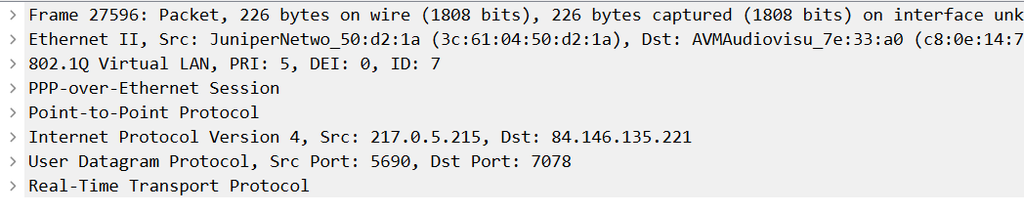
But a traditionally transmitted native VLAN frame captured on a trunk port does not contain the 802.1Q header:
Ethernet II
Internet Protocol Version 4
There is no VLAN ID in that captured Ethernet frame.
The fact that it belongs to the native VLAN is determined by the configuration and context of the trunk—not by a VLAN identifier carried inside that particular frame.
This understanding is extremely important when doing packet analysis. Seeing an untagged frame does not automatically mean VLANs are not being used.
You may simply be capturing traffic from the native VLAN.
The Key Difference
The simplest comparison is:
| Feature | Normal VLAN on a Trunk | Native VLAN |
|---|---|---|
| VLAN exists in VLAN database | Yes | Yes |
| Separate Layer 2 broadcast domain | Yes | Yes |
| VLAN ID | Yes | Yes |
| Normally 802.1Q tagged on trunk | Yes | No |
| Receives untagged trunk traffic | No | Yes |
| Default on Cisco trunks | N/A | Traditionally VLAN 1 |
| Can be changed | N/A | Yes |
| Should match at both ends | Yes | Absolutely |
The native VLAN is therefore not fundamentally a special kind of VLAN.
It is better thought of as: The VLAN designated to handle untagged Ethernet traffic on an 802.1Q trunk.
An Example Cisco Trunk Configuration
A straightforward switch-to-switch trunk might look like this:
vlan 10
 name USERS

vlan 20
 name VOICE

vlan 30
 name SERVERS

vlan 999
 name NATIVE-UNUSED

interface GigabitEthernet1/0/48
 description TRUNK-TO-SWITCH-B
 switchport mode trunk
 switchport trunk native vlan 999
 switchport trunk allowed vlan 10,20,30,999
 switchport nonegotiate
And Switch B should have a corresponding configuration:
interface GigabitEthernet1/0/48
 description TRUNK-TO-SWITCH-A
 switchport mode trunk
 switchport trunk native vlan 999
 switchport trunk allowed vlan 10,20,30,999
 switchport nonegotiate
Now the behavior is clear:
                 802.1Q Trunk

       Switch A ================= Switch B

VLAN 10  -------- tagged 10 -------->
VLAN 20  -------- tagged 20 -------->
VLAN 30  -------- tagged 30 -------->
VLAN 999 -------- untagged --------->
And in the opposite direction, Switch B follows exactly the same rules.
What Have We Learned?
The native VLAN is one of those Ethernet concepts that becomes much easier once you stop thinking of it as a completely different kind of VLAN.
It is still a VLAN.
The difference is what happens on an 802.1Q trunk.
Ordinary VLAN traffic is normally transmitted with an 802.1Q VLAN tag. Native VLAN traffic is traditionally transmitted without that tag, and untagged frames received by the trunk are associated with the native VLAN.
That gives us several important operational rules:
- Understand the difference between an access VLAN and a native VLAN.
- Explicitly configure trunk interfaces.
- Make sure both ends of the trunk use the same native VLAN.
- Avoid relying on VLAN 1 as the production native VLAN.
- Consider using a dedicated, otherwise unused native VLAN.
- Restrict the VLANs permitted across each trunk.
- Remember that an untagged frame in Wireshark may actually be native-VLAN traffic.
Once those concepts are clear, the native VLAN stops being mysterious. It becomes simply another part of understanding exactly how Ethernet frames are being transported across an 802.1Q switched network.
If you would like to help support the continued development of independent networking, broadband, Wi-Fi, VoIP, and packet analysis content, please consider joining our Patreon community where you will gain access to exclusive technical resources, downloadable labs and PCAPs, bonus course content, troubleshooting guides, and additional member-only material. Comments and technical discussion are always welcomed at our Patreon community or on our Discord server. You can also support our work by simply buying us a coffee — every contribution helps us continue creating practical, real-world network science education for professionals and enthusiasts alike.