

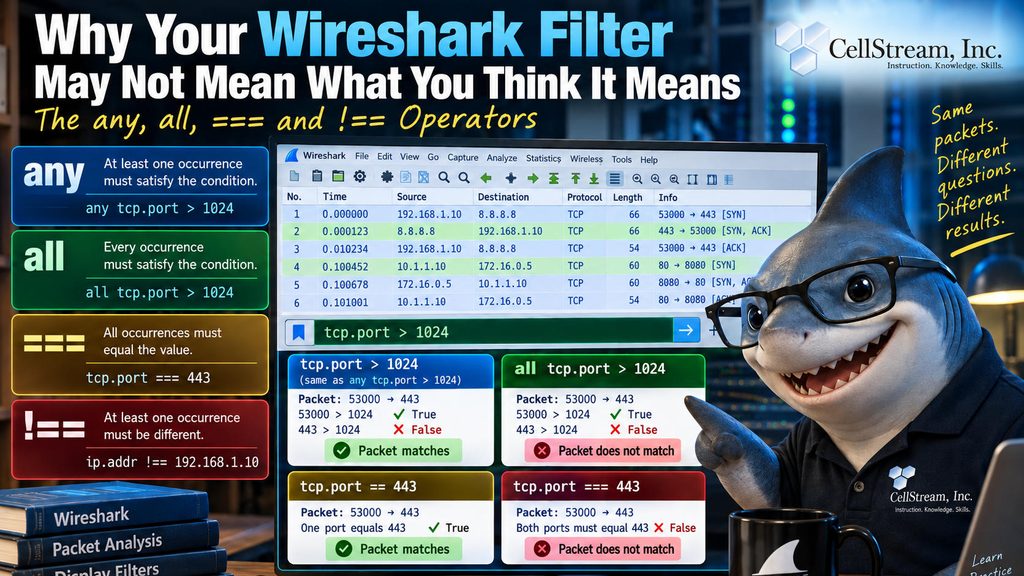
Wireshark display filters can look deceptively simple. For example:
tcp.port > 1024
seems obvious.
But a TCP packet normally has two port values: a source port and a destination port. That means Wireshark may be evaluating more than one value when you write a filter.
Consider:
53000 → 443This packet satisfies:
tcp.port > 1024
because 53000 is greater than 1024.
It also satisfies:
tcp.port < 1024
because 443 is less than 1024.
Both statements are true for the same packet.
That is where operators such as:
any
all
===
and:
!==
become important.
any vs. all
These two filters ask very different questions:
any tcp.port > 1024
means:
At least one TCP port must be greater than 1024.
While:
all tcp.port > 1024
means:
Every TCP port in the packet must be greater than 1024.
For:
53000 → 443the first filter matches.
The second does not.
== Is Not the Same as ===
Most Wireshark users are familiar with:
tcp.port == 443
That means:
At least one occurrence of tcp.port equals 443.
But Wireshark also supports:
tcp.port === 443
That means:
Every occurrence of tcp.port must equal 443.
So for:
53000 → 443tcp.port == 443
is true.
But:
tcp.port === 443
is false.
And != Is Not the Same as !==
The distinction works in the opposite direction too.
ip.addr != 192.168.1.10
effectively means:
All occurrences of ip.addr must be different from 192.168.1.10.
But:
ip.addr !== 192.168.1.10
means:
At least one occurrence must be different.
That second filter can still match a packet that actually contains 192.168.1.10, because the other IP address is probably different.
That is exactly the kind of subtle logic issue that can produce a perfectly valid Wireshark filter—and completely wrong troubleshooting results.
A Quick Reference
==     any occurrence equals
!=     all occurrences are different
===    all occurrences equal
!==    any occurrence is different
The important lesson is simple:
A Wireshark field name does not always represent one value.
Fields such as:
tcp.port
ip.addr
vlan.id
and fields repeated inside encapsulated packets can contain multiple values.
Once that happens, you need to think carefully about whether you mean:
any occurrence
or:
all occurrences.
In the complete Patreon tutorial, I walk through practical examples of any, all, ==, !=, ===, and !==, including one particularly nasty range-filter mistake that can make a filter match packets you never intended to include.
If you would like to help support the continued development of independent networking, broadband, Wi-Fi, VoIP, and packet analysis content, please consider joining our Patreon community where you will gain access to exclusive technical resources, downloadable labs and PCAPs, bonus course content, troubleshooting guides, and additional member-only material. Comments and technical discussion are always welcomed at our Patreon community or on our Discord server. You can also support our work by simply buying us a coffee — every contribution helps us continue creating practical, real-world network science education for professionals and enthusiasts alike.