

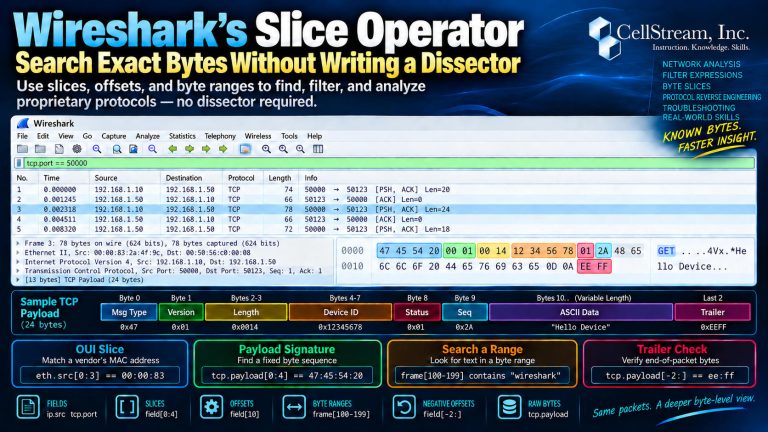
Wireshark gives us thousands of protocol fields to filter on:
ip.srctcp.portdns.qry.namevlan.id
But what happens when the exact information you want isn’t exposed as a field?
That is where Wireshark’s Slice Operator becomes extremely useful.
A slice lets you select specific bytes from a field, payload, protocol, or even the captured frame itself.
For example:
eth.src[0:3]
returns the first three bytes of the Ethernet source MAC address.
That means you can filter on just the OUI portion:
eth.src[0:3] == 00:00:83
You can do the same thing with TCP payload data:
tcp.payload[0:4]
returns the first four bytes of the TCP payload.
So this:
tcp.payload[0:4] == 47:45:54:20
looks specifically for a payload beginning with the bytes representing:
GET
That is much more precise than simply asking whether the payload contains that sequence somewhere.
Search Specific Byte Ranges
Slices can also operate on the entire captured frame.
For example:
frame[100-199] contains "wireshark"
tells Wireshark to search only bytes 100 through 199 of the frame.
This can be extremely useful when investigating:
- proprietary protocols
- undocumented message formats
- fixed byte signatures
- device identifiers
- message types
- protocol trailers
- magic numbers
You can even work backward from the end of a packet:
tcp.payload[-2:] == ee:ff
which checks whether the last two TCP payload bytes are:
EE FF
Why This Matters
Imagine you are troubleshooting a proprietary TCP protocol.
You discover that:
- byte 0 contains the message type
- byte 1 contains the version
- bytes 4 through 7 contain a device ID
- byte 8 contains a status code
You can begin analyzing that protocol directly in Wireshark with expressions such as:
tcp.payload[0] == 01
or:
tcp.payload[8] == 20
Without writing a custom dissector, you have already started identifying different message types and conditions.
That makes the Slice Operator a very useful tool for packet research, troubleshooting, and lightweight protocol reverse engineering.
There Is Much More You Can Do
Slices can work with:
- byte arrays
- strings
- protocol data
- TCP and UDP payloads
- complete captured frames
- positive and negative offsets
- byte ranges
- multiple non-contiguous slices
They can also be used inside calculated Custom Columns, which means selected bytes can appear directly in the Packet List.
In the full Patreon tutorial, I go deeper into Slice Operator syntax, proprietary protocol analysis, payload signatures, negative offsets, compound slices, raw-byte access, calculated columns, and a downloadable synthetic PCAP you can use to practice the techniques yourself.
This is just a start. Continue with the complete Wireshark Slice Operator tutorial on Patreon including a lab exercise and capture file.
If you would like to help support the continued development of independent networking, broadband, Wi-Fi, VoIP, and packet analysis content, please consider joining our Patreon community where you will gain access to exclusive technical resources, downloadable labs and PCAPs, bonus course content, troubleshooting guides, and additional member-only material. Comments and technical discussion are always welcomed at our Patreon community or on our Discord server. You can also support our work by simply buying us a coffee — every contribution helps us continue creating practical, real-world network science education for professionals and enthusiasts alike.