

Most people never think about the Domain Name System (DNS) until something stops working. They enter a website address, press Enter, and expect the page to appear. Somewhere along the way, DNS helps translate the domain name into the IP address needed to reach the destination.
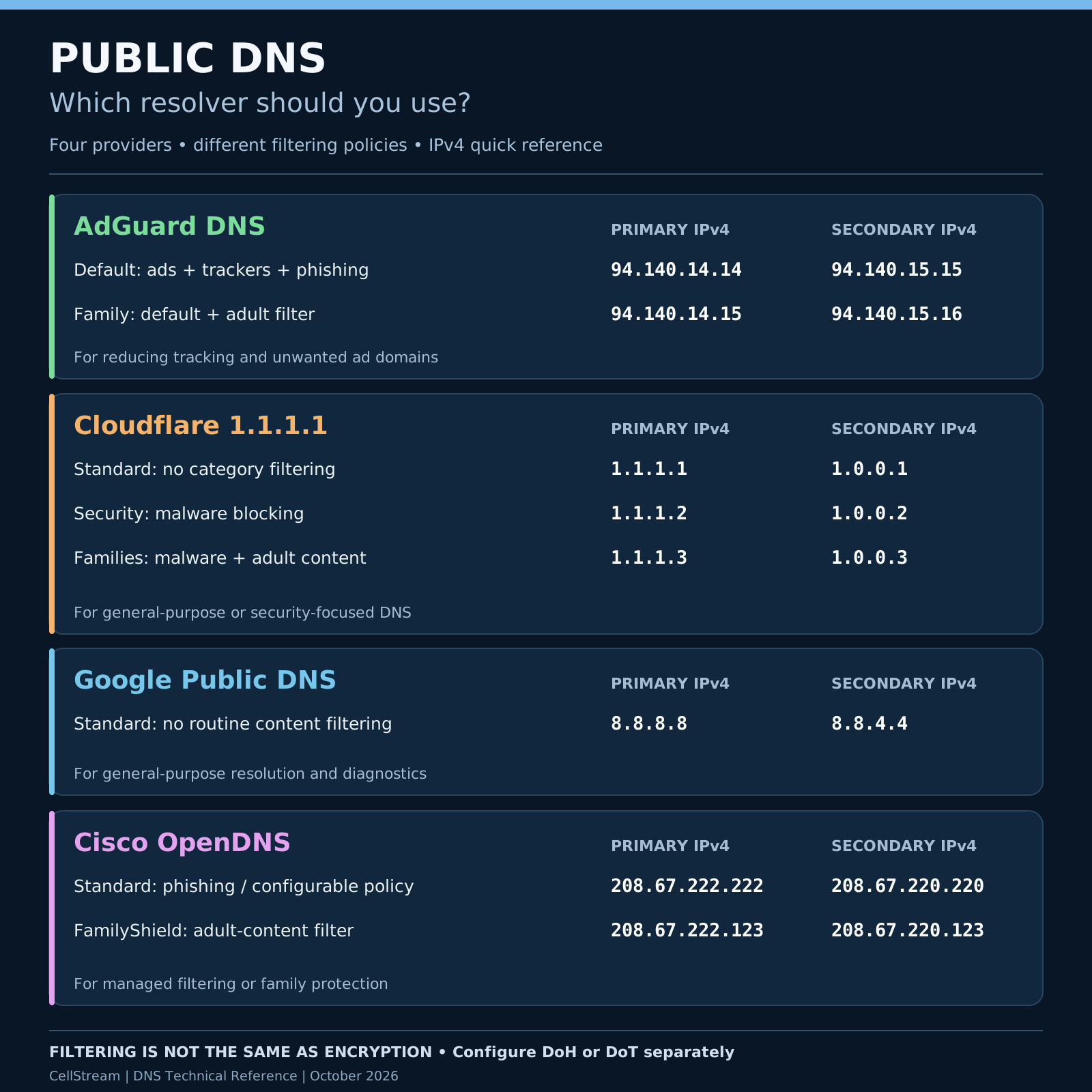
What many Internet users do not realize is that they often have a choice about which DNS service performs those lookups. Their Internet Service Provider (ISP) usually supplies DNS resolver addresses automatically, but those are not necessarily the only options. There are several free public DNS services available, including Google Public DNS, Cloudflare, AdGuard DNS, and Cisco OpenDNS. All four can resolve Internet domain names, but they differ in their approach to security, privacy, performance, and content filtering.
So which one should you use? Let’s examine the alternatives and, more importantly, why you might select one over another. And what must we watch out for when troubleshooting?
What Does a DNS Resolver Actually Do?
When you enter a domain name such as www.example.com, your computer needs to determine the corresponding IP address before it can establish a connection to the destination. Usually, your computer forwards a DNS query to a recursive resolver configured through DHCP, a local network administrator, or operating-system settings. The resolver may already have the answer in its cache. Otherwise, it performs the necessary DNS resolution process, potentially contacting root, top-level-domain, and authoritative DNS servers.
The resolver then returns the result to your computer.
The important point is that the DNS resolver you select influences how those queries are processed. Some resolvers simply provide DNS answers, while others apply security and content-filtering policies.
Let’s look at four popular providers.
1. AdGuard DNS — Filtering Ads, Trackers, and Unwanted Content
AdGuard DNS is particularly interesting because it provides DNS-based filtering without requiring software to be installed on every device. Its default public DNS service is designed to block domains associated with advertising, tracking, and phishing.
Default DNS servers
- Primary:
94.140.14.14 - Secondary:
94.140.15.15
Family Protection DNS servers
- Primary:
94.140.14.15 - Secondary:
94.140.15.16
The Family Protection service adds adult-content filtering and Safe Search functionality.
Why might you choose AdGuard? Perhaps you want to reduce advertising and tracking across multiple devices without configuring a separate browser extension on each one. Configuring AdGuard on a compatible home router can apply the filtering to many devices on the network. There are limitations, however. DNS filtering works at the domain level. It cannot selectively remove every advertisement or tracking element, especially when the unwanted content is served from the same domain as the legitimate website content. Blocking rules can also cause unintended problems. A website or application may fail to load properly because it relies on a domain that the filtering service has blocked.
For troubleshooting, remember this possibility.
2. Cloudflare 1.1.1.1 — General-Purpose DNS With Optional Security Filtering
Cloudflare operates the well-known 1.1.1.1 public recursive DNS service. Its standard resolver emphasizes efficient, reliable DNS resolution without routine category-based content filtering.
Standard DNS servers
- Primary:
1.1.1.1 - Secondary:
1.0.0.1
Cloudflare also provides two filtering alternatives through its 1.1.1.1 for Families service.
Malware blocking
- Primary:
1.1.1.2 - Secondary:
1.0.0.2
Malware and adult-content blocking
- Primary:
1.1.1.3 - Secondary:
1.0.0.3
These separate resolver addresses make Cloudflare straightforward to deploy. A user can select the desired protection category simply by choosing the corresponding DNS addresses.
Why choose Cloudflare? If you want a general-purpose public DNS resolver with an optional malware-blocking service, Cloudflare is worth evaluating. Cloudflare also supports encrypted DNS transport using DNS over HTTPS (DoH) and DNS over TLS (DoT). These protocols help protect DNS messages between the client and the resolver from interception or modification along the network path. However, encrypted DNS does not automatically mean anonymous Internet usage. The DNS provider still processes your queries, and the destination website may still learn information about your connection.
3. Google Public DNS — A General-Purpose DNS Resolver
Google Public DNS has been available since 2009 and remains one of the most recognizable public DNS services.
Standard DNS servers
- Primary:
8.8.8.8 - Secondary:
8.8.4.4
Unlike AdGuard’s default service or Cloudflare’s security-filtering variants, Google Public DNS does not provide general-purpose ad blocking or adult-content filtering. Google generally returns DNS results without applying those content categories, although it may block certain domains for security or legal reasons. Google Public DNS supports DNSSEC validation, DoH, and DoT.
Why might you choose Google? Its well-known resolver addresses, extensive technical documentation, and globally distributed infrastructure make it useful for ordinary DNS resolution and network troubleshooting. In fact, 8.8.8.8 has become a familiar address in network diagnostics. However, there is a distinction worth remembering: successfully pinging 8.8.8.8 does not establish that DNS is working. It simply demonstrates that ICMP communication with that address succeeded.
A proper DNS test requires an actual DNS query.
4. Cisco OpenDNS — Security and Family Filtering
OpenDNS is another long-established public DNS provider and is part of Cisco. Its standard public resolver service provides DNS resolution with phishing protection and options for configurable content-filtering policies.
Standard DNS servers
- Primary:
208.67.222.222 - Secondary:
208.67.220.220
OpenDNS also offers FamilyShield, designed to restrict access to adult content without requiring users to create custom filtering policies.
FamilyShield DNS servers
- Primary:
208.67.222.123 - Secondary:
208.67.220.123
Why choose OpenDNS? It is worth considering where security-oriented DNS resolution or family content filtering is desirable. For organizations and managed networks, OpenDNS’s history of policy-based filtering is particularly relevant. However, the features available in its consumer public resolver services should not be confused with the broader capabilities of Cisco’s enterprise security products.
Does Changing DNS Make the Internet Faster?
This question deserves some attention. You will occasionally hear suggestions that changing to Google DNS or Cloudflare DNS will dramatically improve Internet performance. That is not necessarily true. DNS resolution is only one part of an Internet transaction. Once a domain name has been resolved, the actual application data is normally exchanged directly with the destination service, not forwarded through the DNS provider.
A faster DNS resolver can reduce the delay involved in obtaining an answer, particularly when the answer is not already cached. But switching DNS servers will not increase the provisioned bandwidth of your broadband connection. If you have a 300 Mbps Internet service, changing DNS resolvers is not going to turn that into a 500 Mbps connection.
Another consideration is Content Delivery Network (CDN) behavior. DNS responses can influence which content-delivery server an application uses. Depending on the DNS provider, EDNS Client Subnet handling, and the CDN’s own location-selection methods, changing resolvers may influence the destination selected for subsequent application traffic.
Consequently, the fastest DNS resolver does not necessarily produce the best overall application performance.
For broadband technicians, that’s an important distinction.
What About Privacy and Encrypted DNS?
Traditional DNS typically uses UDP or TCP port 53, with queries and responses transmitted without encryption. That means an observer along the path between your device and the DNS resolver may be able to inspect DNS messages. Modern encrypted DNS technologies address part of this problem.
- DNS over HTTPS (DoH) carries DNS messages using HTTPS, normally over port 443.
- DNS over TLS (DoT) carries DNS messages over a TLS-protected connection, normally using TCP port 853.
Both approaches provide confidentiality and integrity protection for DNS traffic between the client and the recursive resolver. However, simply entering a public DNS provider’s IPv4 address into your network settings does not necessarily enable either technology. The operating system, browser, or local DNS software must be configured to use encrypted DNS. It’s also important to understand that DNS encryption, DNSSEC validation, and DNS-based content filtering solve different problems.
DNSSEC helps establish the authenticity and integrity of signed DNS data. DoH and DoT protect DNS traffic between the client and resolver. Filtering services determine whether particular domain names should be resolved according to the provider’s policies.
These technologies can complement one another, but they are not interchangeable.
Why DNS Filtering Can Complicate Troubleshooting
Imagine that a customer reports that a particular website is unavailable. The technician verifies that the customer’s broadband connection is operational. Other websites work, the customer has a valid IP configuration, and routing appears normal.
The problem might be caused by a DNS filtering policy.
An AdGuard resolver might block a domain associated with advertising or tracking. A Cloudflare security resolver might classify a domain as malicious. A family-filtering service might block content that another resolver allows.
These outcomes can make a functioning website appear unavailable.
One useful troubleshooting approach is to compare DNS query results from different resolvers.
For example, using Windows or Linux with nslookup:
nslookup example.com 1.1.1.1
nslookup example.com 8.8.8.8
nslookup example.com 94.140.14.14
These commands query the specified DNS servers rather than relying on the default system resolver. They can help reveal differences in answers, DNS response codes, or timeouts. For more advanced analysis, tools such as dig, Wireshark, and tshark can provide additional detail.
Be careful, though. Different DNS answers are not automatically evidence of a problem. CDN load balancing, geographical policies, caching, and other legitimate DNS behaviors may produce different results.
Should You Mix DNS Providers?
It might seem logical to configure Cloudflare as the primary DNS resolver and AdGuard as the secondary. However, that combination can undermine the filtering policy you intended to deploy. Operating systems and applications do not necessarily treat the second resolver as a strictly inactive backup. Depending on resolver implementation and network conditions, queries may be sent to different configured DNS servers. If one resolver blocks a domain while another resolves it normally, the resulting behavior may be inconsistent. For predictable filtering, use both addresses associated with the same filtering service.
Also remember that IPv6 resolvers, browser-configured DoH, VPN software, and applications with their own DNS implementations can influence which resolver actually processes a query.
So Which DNS Service Should You Choose?
There is no single correct choice for every user or network.
- For general-purpose DNS resolution without broad content filtering, both Cloudflare and Google are reasonable candidates.
- For DNS-based ad and tracker filtering, consider AdGuard.
- For basic malware-domain blocking without general advertising filters, Cloudflare’s 1.1.1.2 service is an option.
- For family content filtering, evaluate AdGuard Family Protection, Cloudflare for Families, or OpenDNS FamilyShield.
- For more extensive policy requirements, a locally managed filtering solution or dedicated enterprise DNS security service may be more appropriate.
Before changing DNS services across a network, test the resolver from your location. Evaluate query latency, resolution accuracy, application compatibility, filtering behavior, and privacy policies. Also consider whether your local environment depends on internal DNS records, split-horizon DNS, or private namespaces that public resolvers cannot resolve.
This article and graphic are based on the providers’ published documentation:
- AdGuard DNS — Resolver Addresses and Filtering
- Cloudflare — 1.1.1.1 and Family Filtering
- Google Public DNS — Documentation
- Cisco OpenDNS — Standard and FamilyShield Setup
If you would like to help support the continued development of independent networking, broadband, Wi-Fi, VoIP, and packet analysis content, please consider joining our Patreon community where you will gain access to exclusive technical resources, downloadable labs and PCAPs, bonus course content, troubleshooting guides, and additional member-only material. Comments and technical discussion are always welcomed at our Patreon community or on our Discord server. You can also support our work by simply buying us a coffee — every contribution helps us continue creating practical, real-world network science education for professionals and enthusiasts alike.