

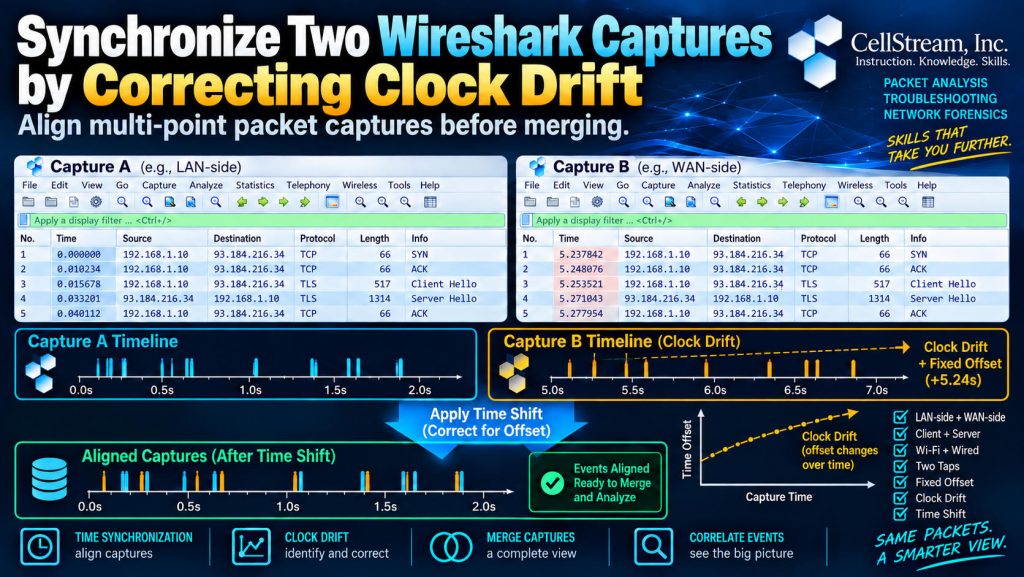
I discussed correlating packet captures from multiple capture points last week. In that post, one of the things I promised was to dive deeper into clock offsets and clock drift.
When troubleshooting from more than one capture point, it is common to compare traffic from places such as:
- the LAN and WAN sides of a router or firewall
- a client and server
- the wireless and wired sides of an access point
- two network TAPs
Before those captures can be compared—or possibly merged—you need to understand how their timestamps relate to one another.
That is not always as simple as adding or subtracting a few seconds.
Clock Offset vs. Clock Drift
Suppose two capture systems are looking at the same traffic.
At the beginning:
Capture A: 10:00:00.000
Capture B: 10:00:01.500
Capture B is 1.5 seconds ahead.
If that difference remains 1.5 seconds throughout the trace, the problem is simply a clock offset.
But suppose 10 minutes later the difference has grown to:
Capture A: 10:10:00.000
Capture B: 10:10:03.000
Now the clocks are not just offset.
They are drifting apart.
A simple:
-1.5 seconds
time shift might align the beginning of the capture, but the end would still be wrong.
Wireshark Can Correct the Drift
Wireshark’s Edit → Time Shift feature can do more than apply a fixed timestamp adjustment:
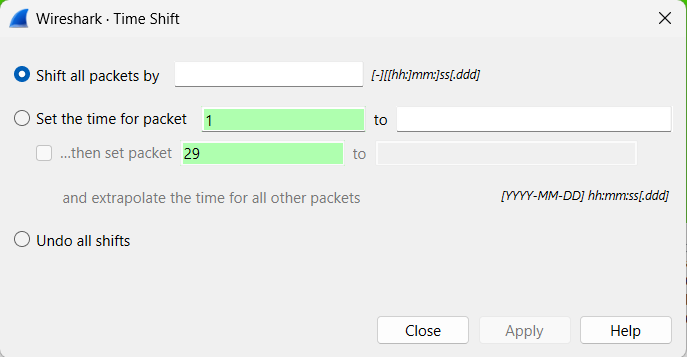
You can identify two known packets and tell Wireshark what their correct timestamps should be.
For example:
Early packet:
Capture B should be shifted by -1.5 seconds

Later packet:
Capture B should be shifted by -3.0 seconds
Wireshark then calculates a linear correction across the capture.
Packets near the beginning receive a correction close to the first value.
Packets near the end receive a correction close to the second.
Packets in between receive an appropriately interpolated correction.
That makes this feature extremely useful when two capture systems’ clocks slowly diverge during a longer troubleshooting session.
Why This Matters
Incorrect timestamps can make multi-point analysis very misleading.
You might see:
- an ACK apparently arriving before the data
- a response appearing before its request
- packets appearing out of order
- incorrect estimates of network delay
The network may be behaving perfectly.
The clocks may be the real problem.
But Be Careful
The goal is not always to make identical packets have identical timestamps.
If your captures were taken at different physical points in the network, a packet really does require time to travel between those locations.
That transit or processing delay may be exactly what you are trying to measure.
So before applying a Time Shift, you need to distinguish:
clock error
from:
real network delay
That is why good packet correlation comes first.
A Useful Wireshark Field
After applying a time correction, take a look at:
frame.offset_shift
You can even add it as a Custom Column.
It shows how much Wireshark has adjusted each packet’s timestamp.
With clock-drift correction, you can actually watch the adjustment change across the capture.
Want to Try It Yourself?
In the full Patreon tutorial, I walk through the complete process of identifying two anchor packets, correcting a drifting capture, verifying the results, and preparing the captures for comparison or merging.
I also include two synthetic PCAP files specifically designed for the exercise:
- one reference capture
- one capture whose clock starts 1.5 seconds ahead and gradually drifts to 3 seconds ahead
A simple fixed Time Shift will not correctly align both ends of the trace—you have to use Wireshark’s two-point clock-drift correction.
If you would like to help support the continued development of independent networking, broadband, Wi-Fi, VoIP, and packet analysis content, please consider joining our Patreon community where you will gain access to exclusive technical resources, downloadable labs and PCAPs, bonus course content, troubleshooting guides, and additional member-only material. Comments and technical discussion are always welcomed at our Patreon community or on our Discord server. You can also support our work by simply buying us a coffee — every contribution helps us continue creating practical, real-world network science education for professionals and enthusiasts alike.