

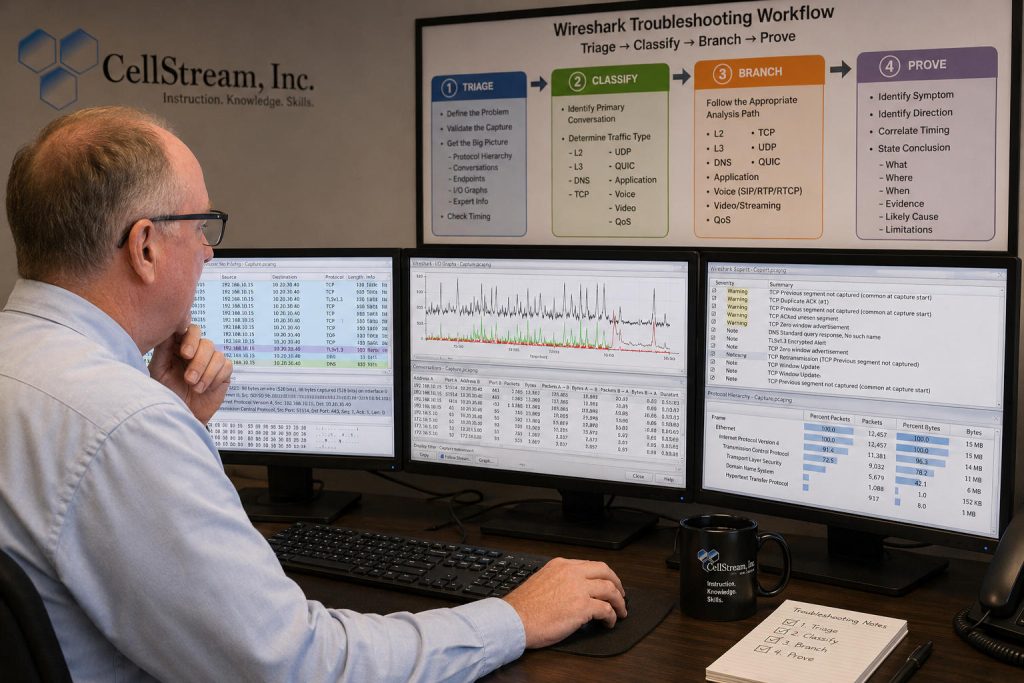
Do not troubleshoot Wireshark captures by chasing random red and black packets. Start with triage, classify the traffic, branch into the correct protocol workflow, and then prove the finding with packet evidence.
The following is a shortened version of our structured “Triage → Classify → Branch → Prove” Wireshark troubleshooting workflow built from your original process and cleaned up into a technician-friendly method. You will find the full detailed version of this workflow and many other troubleshooting workflows on our patreon community site here.
Wireshark Triage → Classify → Branch → Prove
1. Triage
- Define the user problem.
- Validate the capture file.
- Review Capture File Properties.
- Review Protocol Hierarchy.
- Review Conversations and Endpoints.
- Review I/O Graphs.
- Review Expert Information.
- Check timing and long delta values.
2. Classify
- Identify the primary conversation.
- Determine client, server, protocol, ports, and direction.
- Decide the traffic type:
- Layer 2
- Layer 3
- DNS
- TCP
- UDP
- QUIC
- Application
- Voice
- Video
- QoS
3. Branch
Follow the correct analysis branch:
- Layer 2: Ethernet, ARP, VLAN, STP, LLDP/CDP
- Layer 3: IP addressing, TTL, ICMP, fragmentation, MTU, IPv6
- DNS: Queries, responses, delays, errors, retries
- TCP: Handshake, options, RTT, retransmissions, windows, resets
- UDP: Request/response behavior, ICMP errors, application clues
- QUIC: UDP/443, handshake, fallback, loss, MTU
- Application: TLS, HTTP, FTP, SSH, response timing
- Voice: SIP, SDP, RTP, RTCP, ladder diagrams, playback
- Video: RTP video, ABR, HLS/DASH, segments, CDN, buffering
- QoS: VLAN PCP, DSCP, ECN, marking consistency
4. Prove
- Identify the symptom.
- Identify the direction.
- Correlate timing.
- Support the finding with packet evidence.
- State the conclusion clearly.
- Include capture-location limitations when necessary.
This is just a start, you will find the complete article and learning at our Patreon community. You will find the complete post here: https://www.patreon.com/cellstream/posts/troubleshooting-161679117. Thank you to our patreons for your support.
If you would like to help support the continued development of independent networking, broadband, Wi-Fi, VoIP, and packet analysis content, please consider joining our Patreon community where you will gain access to exclusive technical resources, downloadable labs and PCAPs, bonus course content, troubleshooting guides, and additional member-only material. Comments and technical discussion are always welcomed at our Patreon community or on our Discord server. You can also support our work by simply buying us a coffee — every contribution helps us continue creating practical, real-world network science education for professionals and enthusiasts alike.