

Most Wireshark users learn display filters by comparing a field to a value:
ip.addr == 192.168.1.10
tcp.port == 443
dns.qry.name contains "example"
But modern Wireshark display filters can do much more than simple comparisons.
The filter language includes functions that can measure field lengths, count repeated fields, manipulate text, compare values, and even convert field representations.
That means the display-filter bar is becoming less like a simple filter box and more like a lightweight packet-analysis language.
A Few Functions Worth Trying
One of the easiest is:
len()
For example:
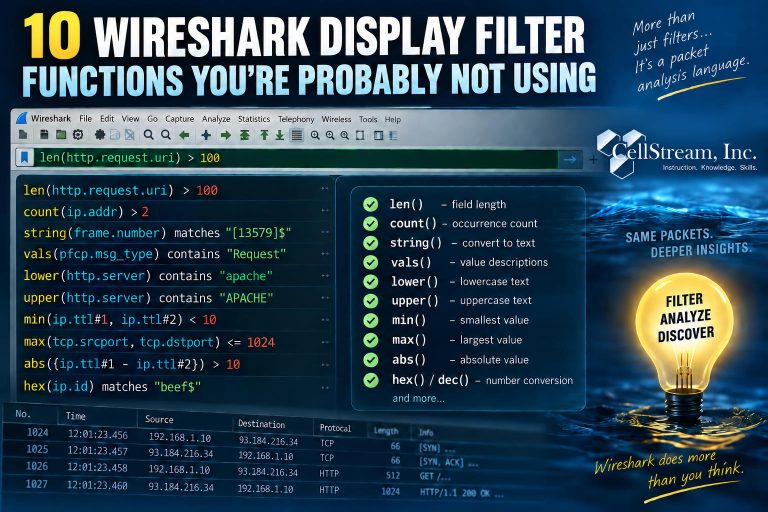
len(http.request.uri) > 100
finds HTTP requests with unusually long URIs.
Or:
len(tcp.payload) > 1000
finds TCP segments carrying more than 1,000 bytes of payload.
Another extremely useful function is:
count()
For example:
count(ip.addr) > 2
can help identify packets containing multiple IPv4 layers.
That can be useful when investigating tunnels, encapsulation, or ICMP errors containing an embedded IP header.
You can also count VLAN tags:
count(vlan.id) > 1
which may help identify stacked VLAN or Q-in-Q traffic.
Wireshark Can Manipulate Text Too
Functions such as:
lower()
and:
upper()
can normalize string fields before comparing them.
For example:
lower(http.server) contains "apache"
matches the server name regardless of how the capitalization appears in the packet.
Another interesting function is:
string()
which converts certain field values to text so that string operators and regular expressions can be applied.
You Can Even Compare Calculated Values
Wireshark also provides functions such as:
min()
max()
and:
abs()
These become especially interesting when combined with arithmetic or the # Layer Operator.
For example, you could compare inner and outer TTL values in an encapsulated packet and look for a large difference between them.
At that point, you’re no longer simply asking:
“Does this field equal this value?”
You’re asking Wireshark to perform a small calculation as part of the analysis.
This Changes How You Can Use Display Filters
Functions let you ask questions such as:
- How long is this field?
- How many times does this field appear?
- What is the smallest or largest value?
- How far apart are two values?
- What descriptive name does Wireshark associate with this number?
- Does a string match after normalizing capitalization?
Those are analytical questions, not just filtering questions.
Want the Complete List and Examples?
In the full Patreon tutorial, I cover 10 useful Wireshark display-filter functions in detail, including:
len()
count()
string()
vals()
lower() / upper()
min() / max()
abs()
hex() / dec()
I also show how to combine them with arithmetic, layer operators, custom columns, and filter buttons to build more powerful troubleshooting workflows.
If you would like to help support the continued development of independent networking, broadband, Wi-Fi, VoIP, and packet analysis content, please consider joining our Patreon community where you will gain access to exclusive technical resources, downloadable labs and PCAPs, bonus course content, troubleshooting guides, and additional member-only material. Comments and technical discussion are always welcomed at our Patreon community or on our Discord server. You can also support our work by simply buying us a coffee — every contribution helps us continue creating practical, real-world network science education for professionals and enthusiasts alike.