
- Version
- Download 17313
- File Size 59.09 KB
- File Count 1
- Create Date August 30, 2014
- Last Updated October 12, 2026
A Wireshark TCP IPv6 Focused Troubleshooting Profile (Wireshark 3.4.0 and onwards)
Thanks to your comments! Enjoy!
Most network engineers and technicians are quickly discovering that with "everything over IP" we are required to understand exactly what this means.
Traditionally, for most data communications this means transport IPv4 over TCP (although QUIC over UDP is gaining major momentum). We are finding that IPv6 represents more than 50% of the traffic on the Internet now.
Beyond IPv6, todays network engineer skills require the ability to troubleshoot TCP. To troubleshoot TCP you have to look at the packets. To look at the packets, the best tool is Wireshark!
For those of you who love Wireshark and are supporting TCP, we would like to offer a great default profile for TCP - this time with an IPv6 focus.
Consider for a moment what would be important in your network administration in TCP over IPv6:
- Knowing the key components of information to track both IPv6 and TCP behavior
- Being able to identify both IPv6 and TCP packets with certain pertinent information
- Being able to detect interesting IPv6 and TCP process issues
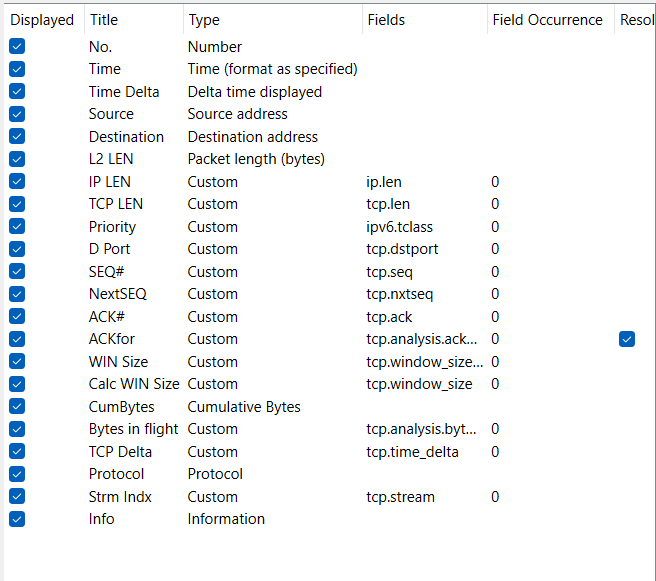
Here are the columns we have created:
We added a ton of nested display filter buttons. These allow you to filter and hunt for a variety of packet types, quickly narrowing your troubleshooting process while gathering evidence along the way:

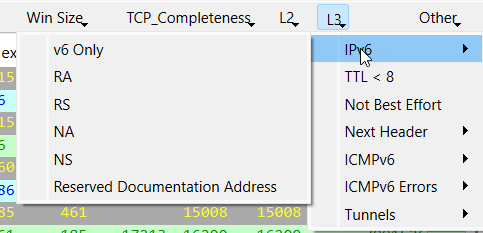
Andy if you click on the "L3" drop down, you will find all the IPv6 related filters as well:
We also added Coloring rules - which some color haters can simply turn off, or you can edit to your preferences.
Start using this IPv6 and TCP Troubleshooting profile right away and you will see, it is like the springboard for your troubleshooting and packet analysis.
Did you find this useful? Would you change or modify this file in any way? If you would like to help support the continued development of independent networking, broadband, Wi-Fi, VoIP, and packet analysis content, please consider joining our Patreon community where you will gain access to exclusive technical resources, downloadable labs and PCAPs, bonus course content, troubleshooting guides, and additional member-only material. You can also leave comments at our Discord server. You can also support our work by simply buying us a coffee — every contribution helps us continue creating practical, real-world network science education for professionals and enthusiasts alike.
Let us know. We thank all who have contributed to this profile over the years. Follow us on Twitter to receive notifications of updates to our profiles: @awalding and/or check us out on Github: https://github.com/amwalding/wireshark_profiles