
- Version
- Download 2165
- File Size 84.25 KB
- File Count 1
- Create Date October 1, 2013
- Last Updated October 13, 2026
Wireshark for Data Center Cheat Sheet
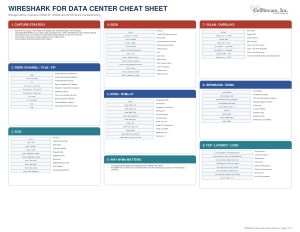 This updated Wireshark for Data Center Cheat Sheet is designed as a practical packet-analysis reference for engineers, technicians, instructors, and support teams working with modern data-center traffic. The original sheet was heavily focused on long field lists for Fibre Channel, FCoE, SCSI, and iSCSI. For example, it cataloged detailed Fibre Channel fields such as
 fc.ox_id, fc.rx_id, fc.s_id, fc.d_id, and fc.time, along with extensive SCSI and iSCSI field references. Wireshark for Data Center Cheat… Wireshark for Data Center Cheat… The updated version keeps the most useful of those fields but reorganizes them around real troubleshooting tasks.
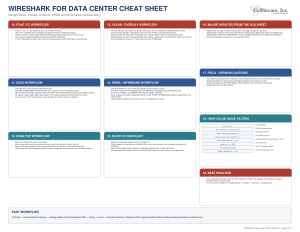
The reason this cheat sheet is useful is that data-center packet analysis is rarely about a single protocol anymore. A storage or application problem may involve Fibre Channel, FCoE, SCSI, iSCSI, TCP, VXLAN, NVMe over Fabrics, RDMA, or InfiniBand—sometimes several of them at once. The sheet gives you a compact way to identify the protocol layer you are working with, isolate the relevant exchange or flow, and then move quickly toward timing, status, error, and transport behavior.
How to use the cheat sheet: begin with the protocol or encapsulation you expect to see, then narrow the capture to the specific exchange, stream, LUN, namespace, VNI, or endpoint involved. For Fibre Channel/FCoE, correlate source and destination IDs with OX_ID/RX_ID and exchange timing. For iSCSI, isolate the related TCP stream, task tag, LUN, request/response frames, and SCSI status. For NVMe/TCP, correlate command IDs and completion IDs with command latency and underlying TCP behavior. For VXLAN, identify the VNI first, then use inner-versus-outer fields to determine whether the problem is in the overlay or underlay.
The updated content also expands well beyond the scope of the original sheet. It now includes NVMe, NVMe/TCP, NVMe/RDMA, VXLAN, InfiniBand/RDMA, modern TCP analysis filters, storage latency checks, and workflow-based troubleshooting guidance. The emphasis is on useful filters and analysis paths rather than trying to reproduce every field Wireshark supports. That makes the sheet much more useful when you are trying to answer practical questions such as: Is the storage device slow? Is TCP losing or reordering packets? Is the overlay adding an MTU problem? Is the problem in the fabric, transport, or storage protocol itself?
Download it, print it, and keep it nearby for data-center troubleshooting, storage-network analysis, Wireshark labs, SAN/NAS support, NVMe-oF work, cloud/overlay troubleshooting, or performance investigations. The key principle behind the sheet is to correlate the full path: protocol → exchange or conversation → storage object → timing → errors → transport behavior. That approach helps prevent a common troubleshooting mistake—stopping at the first visible symptom instead of identifying the actual layer where the problem begins.
Did you find this useful? Would you change or modify this file in any way? If you would like to help support the continued development of independent networking, broadband, Wi-Fi, VoIP, and packet analysis content, please consider joining our Patreon community where you will gain access to exclusive technical resources, downloadable labs and PCAPs, bonus course content, troubleshooting guides, and additional member-only material. You can also leave comments at our Discord server. You can also support our work by simply buying us a coffee — every contribution helps us continue creating practical, real-world network science education for professionals and enthusiasts alike.