
- Version
- Download 2224
- File Size 163.96 KB
- File Count 1
- Create Date June 20, 2014
- Last Updated October 12, 2026
SIP Display Filter Cheat Sheet for Wireshark
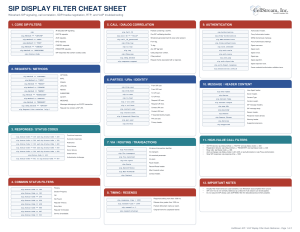
This updated SIP Display Filter Cheat Sheet is designed as a practical reference for anyone troubleshooting SIP signaling, VoIP call setup, registration, authentication, media negotiation, or call-quality problems in Wireshark. The original version was primarily a long alphabetical catalog of SIP fields such as sip.Call-ID, Contact, From/To, Route, Via, authentication fields, and many others. SIP Display Filter Cheat Sheet The new version keeps the most useful of those fields but reorganizes them around real troubleshooting tasks.
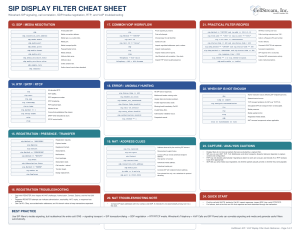
The sheet is useful because SIP analysis usually requires more than simply filtering on sip. You often need to isolate a specific call, find failed transactions, identify authentication loops, follow registrations, inspect Request-URI and Contact information, correlate Via branches and CSeq values, or determine why a call failed with a particular response code. The cheat sheet provides ready-to-use filters for INVITE, REGISTER, BYE, REFER, SUBSCRIBE, NOTIFY, common SIP response classes, authentication challenges, retransmissions, response timing, Call-ID correlation, NAT clues, and malformed or suspicious SIP messages.
How to use the cheat sheet: start broad with sip, then narrow the capture based on the problem you are investigating. For a call problem, find the INVITE, copy the Call-ID, and filter on that call. Then inspect the SIP response sequence, SDP negotiation, and finally RTP/RTCP. For registration issues, follow REGISTER through any 401 or 407 challenge, Authorization exchange, Contact/Expires information, and the final response. For timing problems, use sip.response-time; for suspected retransmissions, use the SIP resend fields.
The sheet intentionally goes beyond SIP headers because successful VoIP troubleshooting requires following the entire call. It includes SDP filters for negotiated media addresses, ports, and codecs, plus RTP and RTCP filters for verifying whether media is actually flowing. It also highlights Via, Contact, and SDP address fields because they are especially useful when investigating NAT, one-way audio, or signaling/media path mismatches.
Download it, print it, and keep it nearby for VoIP troubleshooting, Wireshark labs, SIP training, NOC work, call-flow analysis, and field support. It is intended to help you move quickly from “I see SIP packets” to “I know which transaction, dialog, response, or media path is causing the problem.”
Did you find this useful? Would you change or modify this file in any way? If you would like to help support the continued development of independent networking, broadband, Wi-Fi, VoIP, and packet analysis content, please consider joining our Patreon community where you will gain access to exclusive technical resources, downloadable labs and PCAPs, bonus course content, troubleshooting guides, and additional member-only material. You can also leave comments at our Discord server. You can also support our work by simply buying us a coffee — every contribution helps us continue creating practical, real-world network science education for professionals and enthusiasts alike.