
- Version
- Download 6145
- File Size 4.00 KB
- File Count 1
- Create Date October 2, 2013
- Last Updated October 13, 2026
ICMP Cheat Sheet
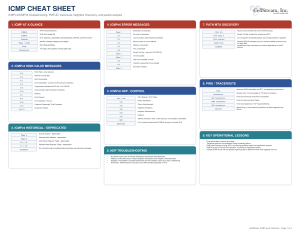
This updated ICMP Cheat Sheet is designed as a practical troubleshooting and packet-analysis reference for anyone working with IPv4, IPv6, routing, broadband, Wi-Fi, VoIP, or general network diagnostics. The source sheet already covered the core ICMP roles—error reporting, reachability testing, traceroute, Path MTU Discovery, and IPv6 Neighbor Discovery. ICMP Cheat Sheet The updated version keeps that same scope but organizes it more tightly around the messages and workflows that matter most in real troubleshooting.
The reason this cheat sheet is useful is that ICMP is often misunderstood as “just ping.” In practice, ICMP is one of the most valuable control and diagnostic mechanisms in IP networking. It tells you when a destination is unreachable, when a TTL or Hop Limit has expired, when a packet is too large for the path, when a router is redirecting traffic, or—on IPv6—when a host is discovering routers and neighbors. Having the important Type/Code combinations in one place makes it much faster to understand what the network is actually reporting.
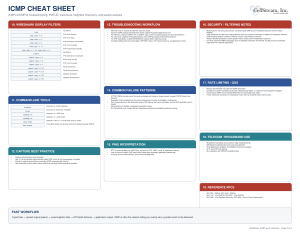
How to use the cheat sheet: start by identifying whether you are looking at ICMPv4 or ICMPv6, then examine the Type and Code. Use that to determine the message category, then correlate the ICMP message with the original packet that triggered it. For reachability testing, look at Echo Request/Reply. For routing and traceroute analysis, focus on Time Exceeded. For MTU problems, look for IPv4 Type 3 Code 4 or ICMPv6 Packet Too Big. For IPv6 connectivity, include Router Solicitation/Advertisement and Neighbor Solicitation/Advertisement before assuming the problem is upstream routing.
The sheet also includes several important operational notes. A failed ping does not necessarily mean the destination is down, because ICMP may be filtered, deprioritized, or rate-limited. Likewise, a missing traceroute hop does not automatically indicate packet loss. The PMTUD sections are especially important because blocked ICMP can create the classic situation where a connection starts successfully but larger transfers hang or fail. The IPv6 section also emphasizes that ICMPv6 is part of normal IPv6 operation and should not be treated as optional diagnostic traffic.
The Wireshark and command-line sections are intended to make the sheet useful during live troubleshooting. It includes display filters for Echo, Destination Unreachable, Time Exceeded, Packet Too Big, Router Solicitation/Advertisement, and Neighbor Solicitation/Advertisement, along with common ping, tracert, traceroute, tracepath, and tcpdump workflows. It is a useful reference for network troubleshooting, IPv6 deployment, broadband support, routing analysis, PMTUD problems, Wireshark labs, classroom instruction, and field/NOC work.
Be sure to also grab the ICMP for IPv4 Wireshark profile in our profiles repository: https://www.cellstream.com/resources/wireshark-profiles-repository
Did you find this useful? Would you change or modify this file in any way? If you would like to help support the continued development of independent networking, broadband, Wi-Fi, VoIP, and packet analysis content, please consider joining our Patreon community where you will gain access to exclusive technical resources, downloadable labs and PCAPs, bonus course content, troubleshooting guides, and additional member-only material. You can also leave comments at our Discord server. You can also support our work by simply buying us a coffee — every contribution helps us continue creating practical, real-world network science education for professionals and enthusiasts alike.