
- Version
- Download 2688
- File Size 159.63 KB
- File Count 1
- Create Date September 19, 2014
- Last Updated October 12, 2026
IPv6 OS Command Cheat Sheet
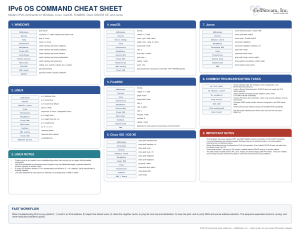 This updated IPv6 OS Command Cheat Sheet is designed as a practical troubleshooting reference for anyone who works with IPv6 across multiple operating systems and network platforms. It brings the most useful commands for Windows, Linux, macOS, FreeBSD, Cisco IOS/IOS XE, and Junos into a single quick-reference sheet so you do not have to remember the different syntax used by each platform. The original version was broader, covering many older or less commonly encountered systems and DHCPv6 clients, while this version is intentionally focused on platforms and commands that are more relevant to current IPv6 work. IPv6 OS Command Cheat Sheet
The sheet is organized around the tasks you are most likely to perform while troubleshooting: displaying IPv6 addresses and routes, testing reachability with ping and traceroute, inspecting the Neighbor Discovery cache, checking multicast membership, viewing sockets or connections, flushing DNS caches, and working with DHCPv6. It also includes commands for confirming default routes, inspecting prefix policy, and testing with a specific source address—areas that are especially useful when IPv6 connectivity behaves differently from IPv4.
How to use the cheat sheet: start with the operating system or device you are working on, then follow a simple troubleshooting sequence. First confirm that the interface has a usable IPv6 address. Next check for a default route, inspect the neighbor cache, and test the local next hop. From there, ping the destination, run a traceroute if necessary, and finally verify DNS and address-selection behavior. This helps separate local-link problems from routing, Neighbor Discovery, and name-resolution issues.
A few important IPv6-specific points are built into the sheet. Neighbor Discovery replaces ARP, so the relevant commands are NDP or neighbor-cache commands rather than IPv4 ARP tools. Link-local addresses may require an interface or zone identifier. And even when DHCPv6 is being used, the IPv6 default gateway is normally learned from Router Advertisements, not from DHCPv6. The sheet also notes where syntax may vary because of OS version, resolver implementation, DHCP client, or vendor software release.
This reference is useful for classroom labs, field troubleshooting, certification study, NOC work, and day-to-day IPv6 operations. Download it, print it, and keep it close when you need to move between operating systems without having to look up the equivalent IPv6 command every time.
Did you find this useful? Would you change or modify this file in any way? If you would like to help support the continued development of independent networking, broadband, Wi-Fi, VoIP, and packet analysis content, please consider joining our Patreon community where you will gain access to exclusive technical resources, downloadable labs and PCAPs, bonus course content, troubleshooting guides, and additional member-only material. You can also leave comments at our Discord server. You can also support our work by simply buying us a coffee — every contribution helps us continue creating practical, real-world network science education for professionals and enthusiasts alike.